
















Panduan Pemasangan Panel Instrumen Digital Golf 7
Ini adalah sebuah Golf 7 digital instrument cluster installation tutorial for Golf 7 / 7.5 (MQB 791), focused on safety, full warning-light visibility, and common mistakes to avoid.
Note: This Golf 7 digital instrument cluster installation guide assumes MQB platform and an original analog needle cluster. Always confirm your OEM cluster photo before ordering.
What you’ll learn in this Golf 7 digital instrument cluster installation
- Compatibility checklist (MQB 791, Golf 7 / 7.5)
- Tools & pre-install safety (ESD / static electricity)
- Step-by-step Golf 7 digital instrument cluster installation workflow (no wire cutting, no drilling)
- Product gallery: real display & UI previews
- Quality benchmarks: lab test summary (English table)
- Post-install checks: warning lights, steering wheel controls, language/units
- Unboxing: what’s included (package list)
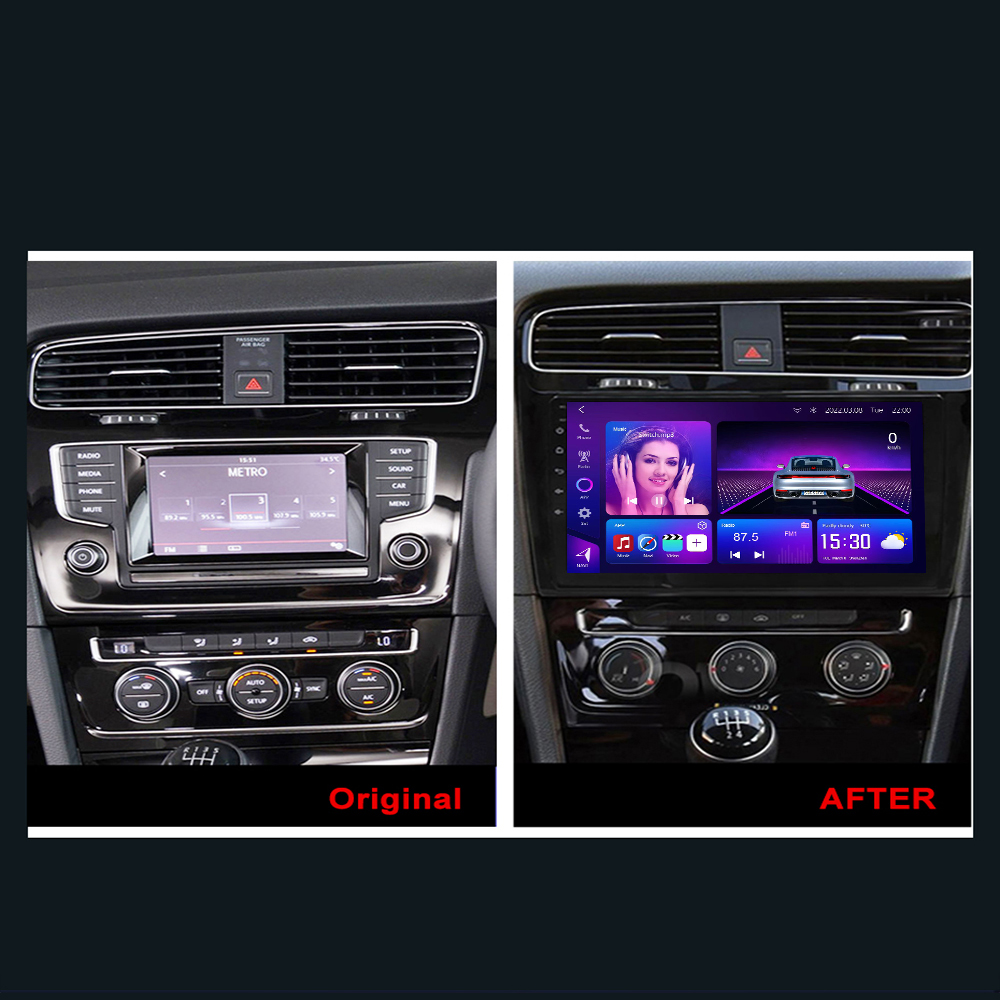
- Optional cockpit pairing: matching Android head unit (before/after reference image)
- Troubleshooting: common mistakes and quick fixes
1) Compatibility checklist (confirm before you start)
Ini Golf 7 digital instrument cluster installation tutorial is written for Golf 7 / 7.5 on MQB upgrading from an analog needle cluster to a kluster instrumen digital.
- Platform: MQB
- Style: 791
- Supported models: Golf 7 / Golf 7.5, including R-Line, GTI, GTE, R
- Steering: Left-hand drive & right-hand drive supported
- Powertrain: Petrol / diesel / hybrid supported
Dashboard bezel removal can differ slightly by trim/region, but the core workflow remains the same.
2) Why this retrofit is “safe” compared to generic upgrades
No coding, no cutting
The workflow is designed for non-destructive installation: no drilling, no wire cutting, and no firmware flashing. It does not modify factory vehicle data.
Linux system stability
A dedicated Linux platform prioritizes fast boot and reliability (often ~3 seconds) and avoids lag.
Full warning-light visibility
A proper instrument cluster retrofit must keep all fault lights and body warnings visible. Missing warnings is a safety risk.
3) Tools & safety preparation (do this first)
Tools you should prepare
- Alat pelepas trim plastik
- Soft cloth / towel (protect dashboard)
- Gloves (optional, keeps surfaces clean)
ESD / static electricity precautions (important)
- Wash hands and discharge static before handling parts
- Touch a grounded metal surface briefly (example: a metal water pipe)
- Hold the PCB by its edges only — avoid touching components directly
4) Step-by-step Golf 7 digital instrument cluster installation
Step 1 — Remove the instrument cluster trim
Use plastic trim tools to gently remove the dashboard trim around the cluster. Work slowly to avoid scratches.
Step 2 — Remove the original analog cluster
Carefully pull the factory needle cluster out to access the rear connectors. Protect surfaces with a soft cloth.
Step 3 — Connect the new digital cluster (plug-and-play)
Connect the new cluster using the supplied harness/adapter layout. This Golf 7 digital instrument cluster installation workflow is designed for no cutting dan tanpa pengeboran.
Step 4 — Reinstall and confirm fitment
Seat the cluster into the factory position, then reinstall the trim. Confirm there are no gaps, no stressed wiring, and no resistance during assembly.
5) Product gallery (real photos & UI previews)
Use these images to verify the expected UI layout and display style after a correct Golf 7 digital instrument cluster installation.


6) Quality benchmarks (lab test summary)
These quality benchmarks support long-term stability for a Golf 7 digital instrument cluster installation, including voltage range, surge, ESD, temperature operation, EMI, and stress tests.
| Tidak. | Test item | Test conditions | Hasil |
|---|---|---|---|
| 1 | Basic function test | Basic function checklist verification | LULUS |
| 2 | Power supply operating voltage range test | Normal operation within power supply range: 9V–16V | LULUS |
| 3 | Surge test | 1) High-frequency surge test 2) Low-frequency surge test | LULUS |
| 4 | Power fluctuation test | Simulate vehicle power supply fluctuations | LULUS |
| 5 | ESD (electrostatic discharge) test |
1) Air discharge: Unpowered: 25kV Powered: 10kV 2) Contact discharge: Unpowered: 15kV |
LULUS |
| 6 | Low-temperature storage | Store for 48 hours at -40°C environment | LULUS |
| 7 | Low-temperature operation | Operate for 24 hours at -30°C environment | LULUS |
| 8 | High-temperature operation | Operate for 24 hours at 70°C environment | LULUS |
| 9 | High-temperature storage | Store for 48 hours at 85°C environment | LULUS |
| 10 | EMI test (two-way radio interference) | No interference to the test unit during two-way radio communication | LULUS |
| 11 | Repeated power on/off test | Power cycling: 1,000,000 times | LULUS |
| 12 | Software stress test | Continuous CAN data stress test | LULUS |
| 13 | DDR / Flash read-write stress test | Storage component stress read/write test | LULUS |
If any warning indicator is missing after installation, stop and re-check connectors and fitment—this is not optional.
7) Post-install setup checklist (don’t skip)
- Confirm boot and driving data display
- Test kontrol setir (menu navigation, confirm/back)
- Atur bahasa dan unit (km/h vs mph, °C vs °F)
- Konfirmasi all warning lights appear during self-check
- Verify passive reminders and body warnings are visible
- If supported: check OTA update menu and upgrade entry
This is the pass/fail rule for Golf 7 digital instrument cluster installation: no missing warning lights.
Optional cockpit upgrade: VW Golf MK7 Android Head Unit (CarMP5) .
8) Installation video tutorial
Use the video below to match trim removal and connector handling.
9) Troubleshooting (common issues)
Issue A: Cluster fault after installation
- Confirm the original cluster speaker/buzzer was not removed
- Re-seat connectors: fully inserted, no bent pins, no loose harness
Issue B: Missing warnings or incomplete vehicle info
- Stop and re-check: a cluster that hides warnings is unsafe
- Confirm you are using the correct MQB 791 variant for analog-to-digital retrofit
Issue C: Steering wheel controls not responding
- Re-check connector seating
- Confirm your vehicle supports steering-wheel cluster navigation from factory
10) What’s in the box (package list)
Check all contents before dashboard disassembly.

Recommended purchase links
If you want the exact items referenced in this Golf 7 digital instrument cluster installation guide:
Pertanyaan yang Sering Diajukan
Is this Golf 7 digital instrument cluster installation plug-and-play?
Yes, it is designed for no wire cutting and no drilling, using the supplied harness/adapter layout.
Does this Golf 7 digital instrument cluster installation require coding or flashing?
No. The workflow is designed for no coding, no firmware flashing, and no changes to factory vehicle data.
Will it show all factory warning lights and vehicle information?
It is designed to keep full warning-light visibility so you don’t lose body warnings or fault indicators.
What is the biggest installation mistake to avoid?
Do not remove the original cluster speaker/buzzer. Removing it can trigger an instrument cluster fault.





Add comment