













Jangan Membeli Upgrade Cluster Digital Volkswagen yang Salah
Jangan Membeli Upgrade Cluster Digital Volkswagen yang Salah
Compare Volkswagen Digital Cluster Upgrade routes by model fitment, LCD dashboard functions, CarPlay display support, installation boundaries and product-specific buying requirements before ordering.
Similar Volkswagen dashboards may require different digital cluster routes.
Model year, dashboard photo, original cluster layout, steering side and required functions.
It helps you review the correct Volkswagen digital cluster route before choosing a unit.
About iKagoo Volkswagen Digital Cluster Upgrades
iKagoo provides vehicle-specific aftermarket Volkswagen Digital Cluster Upgrade and Full LCD Dashboard product routes for supported Volkswagen applications. Instead of treating one screen as universal, we direct buyers to confirm the original instrument cluster, dashboard layout, steering-side configuration and required display functions before selecting a product.
Perlengkapan Khusus Kendaraan
Product selection should be based on the exact Volkswagen route, original instrument cluster, dashboard layout and required functions rather than model-name assumptions alone.
Factory-Style LCD Integration
Supported upgrades are intended to create a clean, integrated LCD dashboard appearance after correct fitment review and proper installation.
Clear Support Route
Hardware product selection is provided through iKagoo. Optional compatible software-package support may be reviewed through FixMyDash where applicable.
What a Volkswagen Digital Cluster Upgrade Includes
A Volkswagen Digital Cluster Upgrade replaces or modernizes the original instrument display area with a digital instrument cluster or LCD dashboard interface on a supported vehicle-specific route. The correct unit depends on the original cluster form, connector route, dashboard structure and the display functions the owner expects to retain or add.
Volkswagen Digital Cluster Upgrade
The main search and product-route term for this page. It describes the buyer’s goal: upgrading a compatible Volkswagen dashboard with a model-specific digital cluster solution.
Gugus Instrumen Digital
The main iKagoo product-category term for a digital instrument display upgrade intended for a supported vehicle-specific dashboard route.
Peningkatan Layar LCD Dashboard
A customer-facing term describing a dashboard upgrade route that replaces or modernizes the instrument-display appearance with an LCD-based interface.
Dasbor LCD Penuh
A descriptive term for the digital dashboard appearance shown in compatible product configurations; it does not by itself confirm vehicle fitment.
Perlengkapan Khusus Kendaraan
Selection based on the original vehicle, cluster form, dashboard route, steering-side layout and required functions before purchase.
CarPlay Display Route
A separately confirmed screen-routing configuration. A working CarPlay connection does not automatically mean maps appear in the instrument cluster.
Buying principle: A Volkswagen Digital Cluster Upgrade should be selected by confirmed vehicle route, not only by model name. Specifications and display functions should not be treated as universal across the full Volkswagen range.
Why Drivers Consider a Volkswagen Digital Cluster Upgrade
A Volkswagen Digital Cluster Upgrade can modernize the dashboard layout and present vehicle information through a full LCD interface. The value is strongest when the buyer confirms the correct vehicle route before ordering, rather than assuming that every Volkswagen dashboard accepts the same unit.
Typical Upgrade Goals
- Replace an analog-style instrument appearance with a modern LCD dashboard interface.
- Improve visual presentation of speed, RPM and supported vehicle-status information.
- Select from available interface styles on applicable product configurations.
- Review supported screen-routing options for navigation or connected display use.
- Choose a model-specific Volkswagen digital cluster route rather than relying on a universal dashboard claim.

Installed LCD dashboard appearance example for a Volkswagen Digital Cluster Upgrade route.
Purchase rule: Confirm the exact Volkswagen model, year, steering-side layout and original instrument cluster before choosing a product route. Similar-looking dashboards do not automatically use the same digital cluster unit.
Buying Checklist Before Choosing a Volkswagen Digital Cluster Upgrade
Use this checklist before ordering. It keeps the page focused on buyer decisions instead of treating the product as a universal accessory.
Confirm the Exact Vehicle Route
- Volkswagen model and production year.
- Market version where relevant.
- Left-hand drive or right-hand drive dashboard layout.
- Original analog or digital instrument cluster baseline.
Confirm the Required Display Functions
- Speed, RPM, fuel and warning display expectations.
- Steering-wheel menu operation where supported.
- CarPlay or navigation display routing if required.
- Preferred LCD dashboard interface style.
Confirm Installation Boundaries
- Dashboard disassembly and original cluster removal may be required.
- Original-part transfer may be required on selected routes.
- Plug-and-play wiring does not mean zero installation work.
- Final calibration and post-install checks may be required.
Confirm Product Page Details
- Current specifications and screen size.
- Available functions for the selected product route.
- Current product price and availability.
- Compatible software support route where applicable.
Selected 12.3-Inch Volkswagen Digital Cluster Feature Reference
The following information describes the selected 12.3-inch digital cluster configuration shown in this promotional material. Volkswagen Digital Cluster Upgrade routes may use different specifications or functions, so the vehicle-specific product page remains the final reference before purchase.
Do not treat these specifications as universal for every Volkswagen Digital Cluster Upgrade. The Volkswagen digital cluster collection may include different screen sizes, hardware routes, functions and prices depending on vehicle application.
Available LCD Dashboard Interface Examples
These images show interface-style examples included in the original promotional content. The exact available interface pages and theme selection should be confirmed for the chosen Volkswagen Digital Cluster Upgrade before purchase.
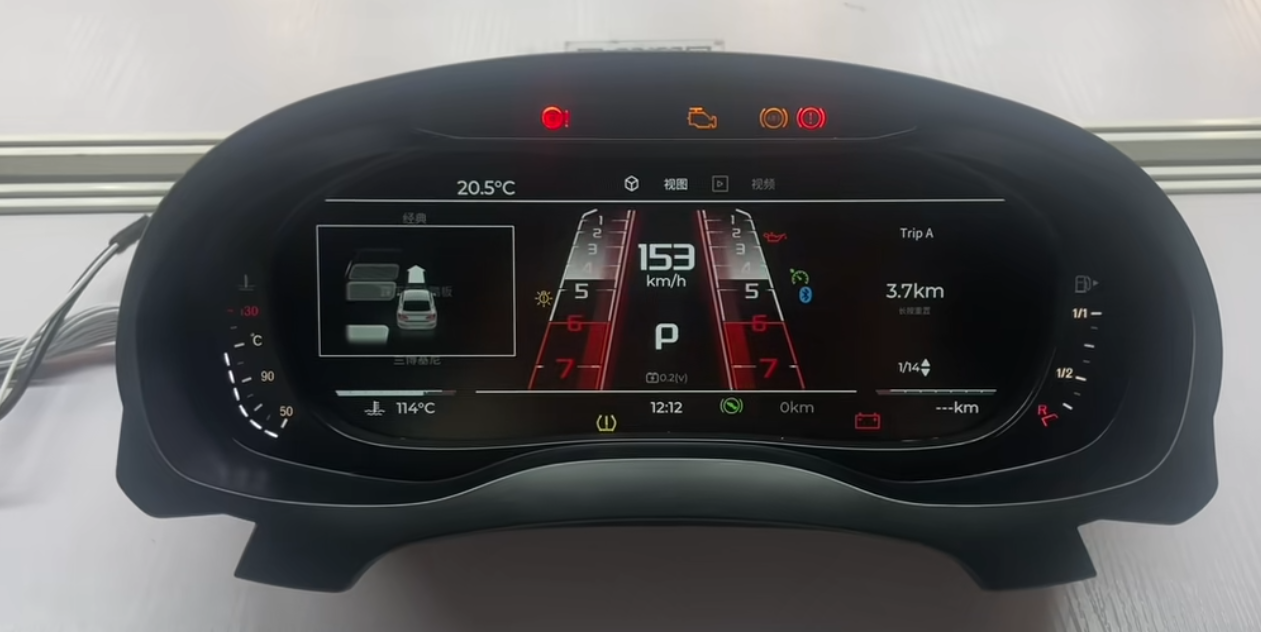
Sport-style LCD dashboard interface example.
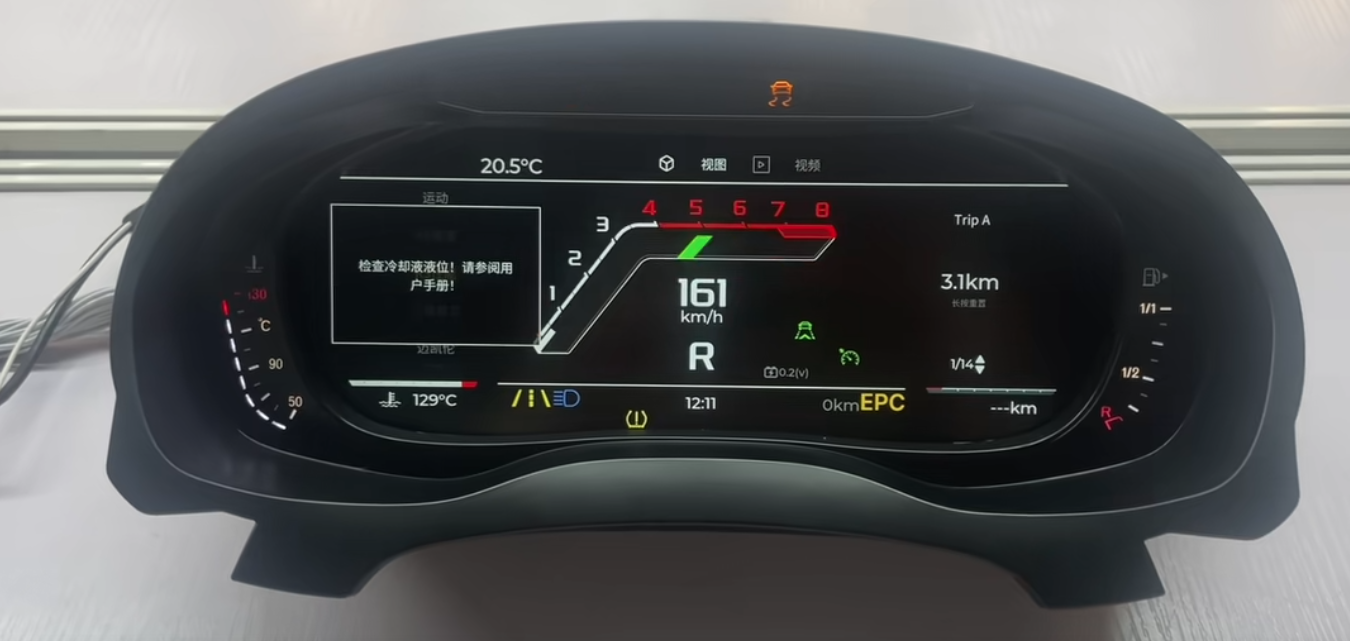
Factory-style digital dashboard interface example.
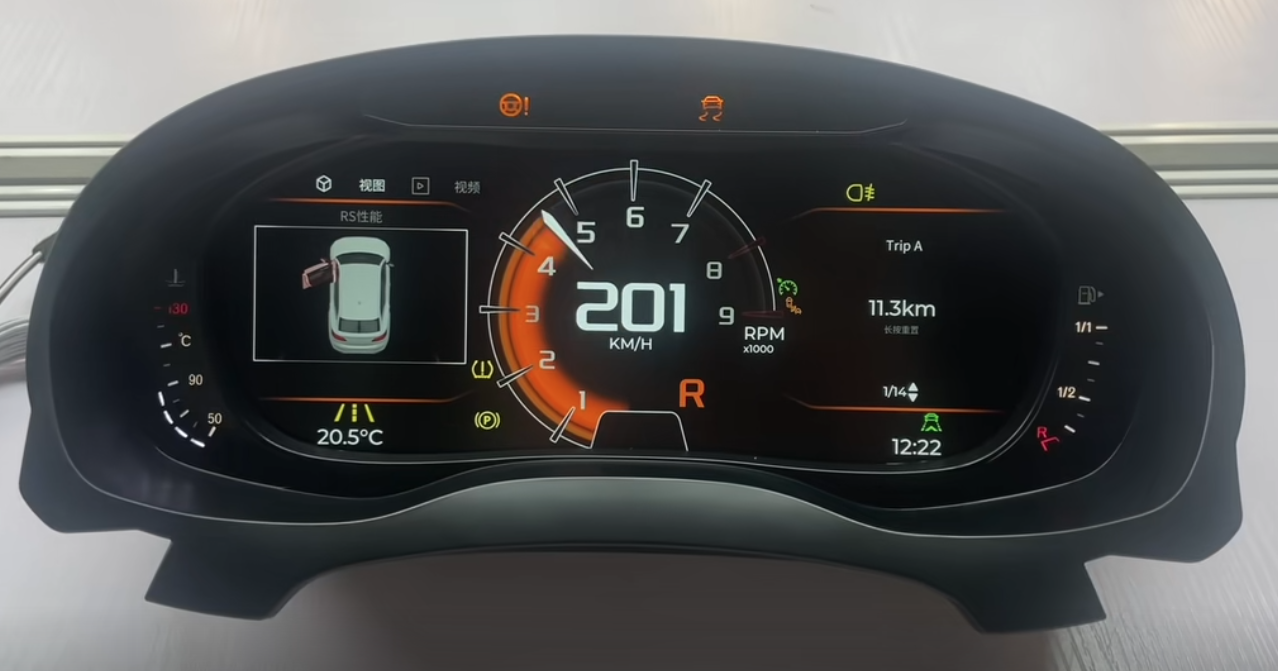
Alternative LCD dashboard interface example.
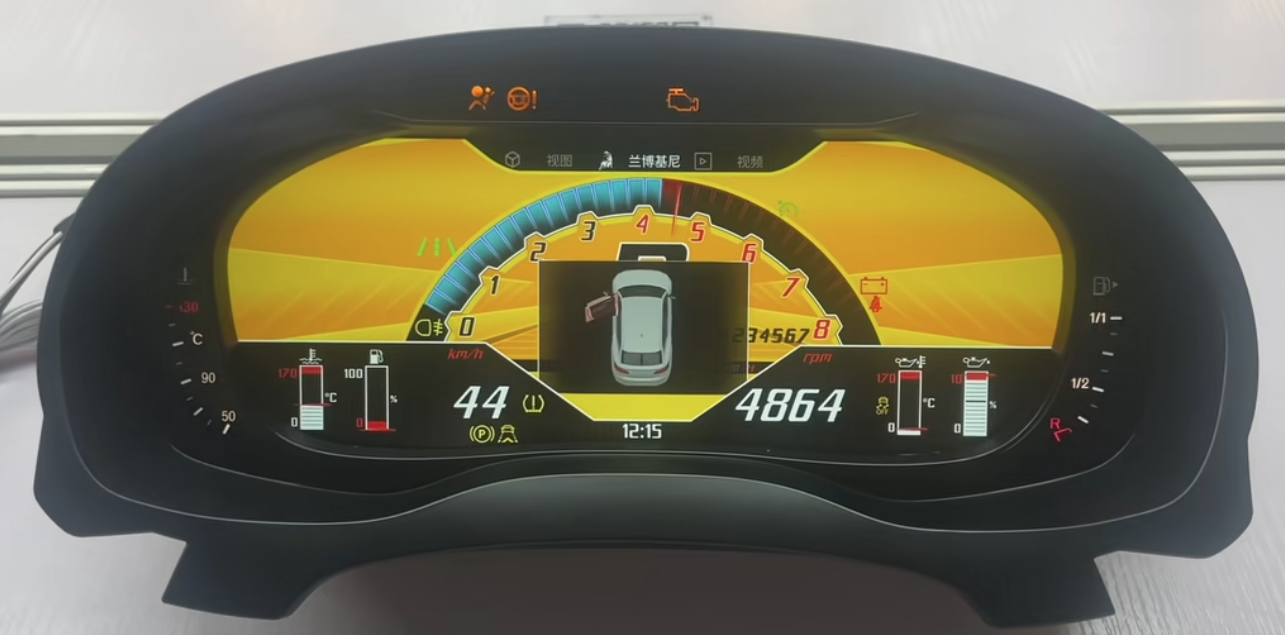
Performance-style digital dashboard interface example.
Installation and Integration Boundary
Volkswagen Digital Cluster Upgrade installation is vehicle-specific. Some supported routes use the original vehicle wiring connection without cutting or splicing the factory harness, but the installation process may still require dashboard disassembly, removal of the original cluster, original-part transfer, configuration work or final calibration checks.
What Plug-and-Play Can Mean
- The supported route uses the original vehicle wiring connection.
- The factory harness is not cut or spliced under the confirmed installation route.
- The selected unit is intended for a matching vehicle-specific configuration.
Apa Arti Plug-and-Play yang Tidak Dimaksud
- It does not mean every Volkswagen dashboard is compatible.
- It does not mean no dashboard removal or component transfer is required.
- It does not mean no setup, calibration or post-installation checks are needed.
- It does not automatically confirm CarPlay map display on the cluster.
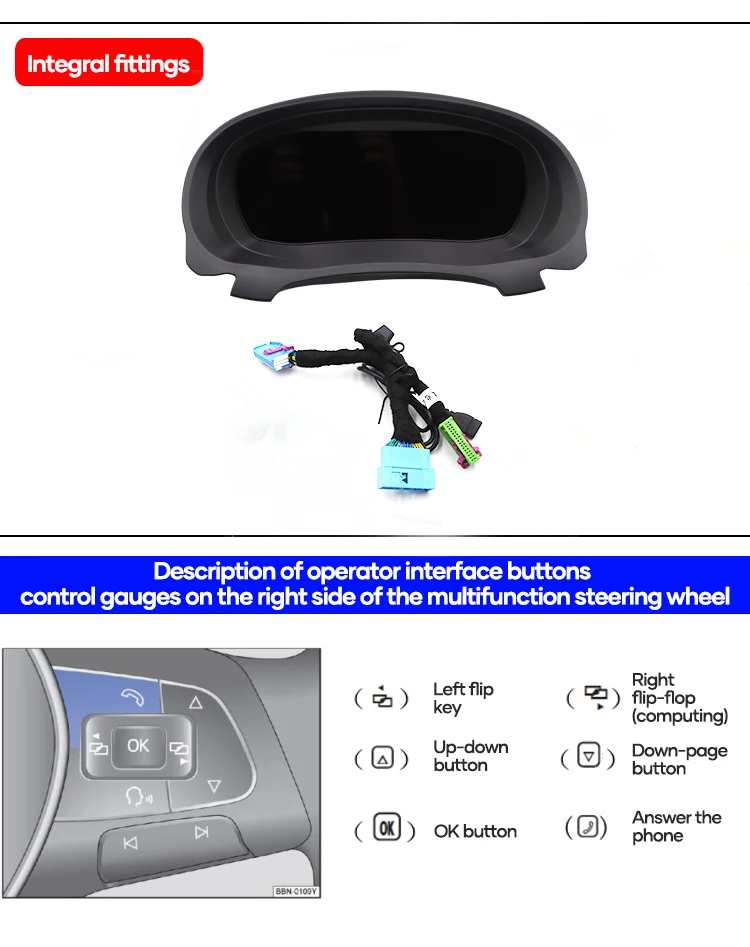
Steering-wheel control reference shown in the promotional material.
Functions to Check After Installation
- Stable screen startup and readable instrument display.
- Speed, RPM, fuel information and warning indicator behavior where supported.
- Steering-wheel menu operation where included in the selected route.
- Day/night brightness behavior and screen readability.
- CarPlay or navigation display only when the confirmed route supports it.
- Software-update access only through the correct supported system route.
Volkswagen Digital Cluster Upgrade Routes to Review
iKagoo offers Volkswagen digital instrument cluster products through model-specific routes. The examples below are browsing directions, not a universal compatibility claim.
| Rute Volkswagen | What the Buyer Should Review | Ordering Boundary |
|---|---|---|
| Passat Digital Cluster Routes | Original cluster layout, platform route, dashboard images and required functions. | Order only after matching the correct Passat-specific product route. |
| Golf Digital Cluster Routes | Vehicle generation, original analog or digital cluster baseline and connector details. | Do not assume all Golf generations use the same display unit. |
| Jetta Digital Cluster Routes | Model year, market version and original instrument panel reference. | Confirm the exact product listing before purchase. |
| Tiguan Digital Cluster Routes | Original dashboard configuration and vehicle-specific installation route. | Appearance alone is not enough to confirm fitment. |
| Polo and Other VW Routes | Product-page specifications, screen size, vehicle photos and required features. | Price and functionality may differ by product route. |
Browse the current Volkswagen Digital Cluster Upgrade collection to check available model-specific products, current prices and listed specifications: Volkswagen Digital Cluster Upgrade Collection.
CarPlay Display, Software Updates and Support Routes
Display routing and software support should be treated as separate technical decisions. A Volkswagen Digital Cluster Upgrade may provide advanced display options on a supported route, but those functions must be confirmed before ordering.
Volkswagen Digital Cluster Upgrade Collection
Browse model-specific Volkswagen digital instrument cluster products, listed features and current product-page pricing.
Browse Volkswagen Digital Cluster Upgrades →Panduan Pembelian Digital Cluster
Review the fitment evidence buyers should prepare before choosing any full LCD dashboard upgrade.
Read the Digital Cluster Guide →VW / Audi CarPlay Panduan Rute Tampilan
CarPlay connection does not automatically mean navigation maps will display in the instrument cluster.
Check the CarPlay Route →Online / USB Software Update Guide
Review supported update methods for compatible iKagoo Volkswagen and Audi digital cluster systems.
View the Update Guide →FixMyDash Software Support Service
Optional compatibility review and software-package support for eligible devices. This service does not guarantee repair of every hardware, wiring, communication or vehicle fault.
View Software Support →Pertanyaan yang Sering Diajukan
Is this page for one specific Volkswagen Digital Cluster Upgrade product?
No. This page introduces Volkswagen Digital Cluster Upgrade options and selected feature examples. Product specifications, fitment and pricing must be checked on the relevant model-specific product page.
Do all Volkswagen digital clusters use the same 12.3-inch specification?
No. The 12.3-inch specification shown here refers to a selected configuration used in the promotional material. Screen size and hardware specifications may vary by product route.
Can I choose a Volkswagen Digital Cluster Upgrade only by model name?
No. Buyers should confirm the year, original dashboard, instrument cluster layout, steering-side configuration and required functions before ordering.
Apakah Plug-and-Play berarti tidak diperlukan pekerjaan pemasangan?
No. On a supported route, plug-and-play means the factory wiring connection is used without cutting or splicing the original harness. Dashboard removal, component transfer, setup or final verification may still be required.
Will CarPlay maps automatically display on the instrument cluster?
No. Instrument-cluster map display depends on the confirmed CarPlay or projection route. Buyers who need this function should review the dedicated CarPlay display route guide first.
Why is there no fixed price displayed on this page?
Because this page covers multiple Volkswagen Digital Cluster Upgrade routes. Current pricing can differ by vehicle application, hardware configuration and availability. Use the collection or product page for the current listed price.
Does FixMyDash provide a guaranteed hardware repair warranty for these products?
No. FixMyDash is an optional software-upgrade and technical-support service route for supported devices. It does not guarantee repair of all hardware, wiring, communication, third-party modification or vehicle faults.
Choose the Right Volkswagen Digital Cluster Upgrade
Start with your exact Volkswagen model and original dashboard configuration. Then review the relevant iKagoo product page for current specifications, available functions, fitment requirements and current price before ordering.



Komentar 4
Zsolt
Volkswagen t4 2002 évjarathoz is létezik ilyen műszerfal?
És mennyibe kerül?
王者
Please contact customer service and send a photo of your original vehicle’s instrument cluster. Customer service will then help you install a digital instrument cluster.
Fabio Arana
Can be Work for VW gol g3 2005
chenjin16316
yes