













Jangan Membeli Upgrade Cluster Digital Volkswagen yang Salah
Jangan Membeli Upgrade Cluster Digital Volkswagen yang Salah
Bandingkan rute peningkatan Cluster Digital Volkswagen berdasarkan kesesuaian model, fungsi dasbor LCD, dukungan tampilan CarPlay, batasan pemasangan, dan persyaratan pembelian khusus produk sebelum memesan.
Dasbor Volkswagen yang mirip mungkin memerlukan rute cluster digital yang berbeda.
Tahun model, foto dasbor, tata letak cluster asli, sisi kemudi, dan fungsi yang diperlukan.
Ini membantu Anda meninjau rute cluster digital Volkswagen yang tepat sebelum memilih unit.
Tentang iKagoo Upgrade Kluster Digital Volkswagen
iKagoo menyediakan rute produk aftermarket khusus kendaraan untuk Volkswagen Digital Cluster Upgrade dan Dasbor LCD Penuh pada aplikasi Volkswagen yang didukung. Alih-alih memperlakukan satu layar sebagai universal, kami mengarahkan pembeli untuk mengonfirmasi kluster instrumen asli, tata letak dasbor, konfigurasi sisi kemudi, dan fungsi tampilan yang diperlukan sebelum memilih produk.
Perlengkapan Khusus Kendaraan
Pemilihan produk harus didasarkan pada rute Volkswagen yang tepat, kluster instrumen asli, tata letak dasbor, dan fungsi yang dibutuhkan, bukan hanya berdasarkan asumsi nama model.
Integrasi LCD Gaya Pabrik
Peningkatan yang didukung dimaksudkan untuk menciptakan tampilan dasbor LCD yang bersih dan terintegrasi setelah peninjauan pemasangan yang benar dan instalasi yang tepat.
Rute Dukungan yang Jelas
Pemilihan produk perangkat keras disediakan melalui iKagoo. Dukungan paket perangkat lunak yang kompatibel secara opsional dapat ditinjau melalui FixMyDash jika berlaku.
Apa yang Termasuk dalam Upgrade Kluster Digital Volkswagen
Upgrade Kluster Digital Volkswagen menggantikan atau memodernisasi area tampilan instrumen asli dengan kluster instrumen digital atau antarmuka dasbor LCD pada rute khusus kendaraan yang didukung. Unit yang tepat bergantung pada bentuk kluster asli, rute konektor, struktur dasbor, dan fungsi tampilan yang diharapkan pemilik untuk dipertahankan atau ditambahkan.
Upgrade Kluster Digital Volkswagen
Istilah pencarian utama dan rute produk untuk halaman ini. Ini menggambarkan tujuan pembeli: meningkatkan dasbor Volkswagen yang kompatibel dengan solusi cluster digital khusus model.
Gugus Instrumen Digital
Istilah kategori produk utama iKagoo untuk peningkatan tampilan instrumen digital yang ditujukan untuk rute dasbor khusus kendaraan yang didukung.
Peningkatan Layar LCD Dashboard
Istilah yang diperuntukkan bagi pelanggan yang menjelaskan rute peningkatan dasbor yang menggantikan atau memodernisasi tampilan instrumen dengan antarmuka berbasis LCD.
Dasbor LCD Penuh
Istilah deskriptif untuk penampilan dasbor digital yang ditampilkan dalam konfigurasi produk yang kompatibel; istilah ini tidak dengan sendirinya mengonfirmasi kesesuaian kendaraan.
Perlengkapan Khusus Kendaraan
Pemilihan berdasarkan kendaraan asli, bentuk cluster, rute dashboard, tata letak sisi kemudi, dan fungsi yang dibutuhkan sebelum pembelian.
Rute Tampilan CarPlay
Konfigurasi rute layar yang dikonfirmasi secara terpisah. Koneksi CarPlay yang berfungsi tidak secara otomatis berarti peta muncul di cluster instrumen.
Prinsip pembelian: Peningkatan Cluster Digital Volkswagen harus dipilih berdasarkan rute kendaraan yang dikonfirmasi, bukan hanya berdasarkan nama model. Spesifikasi dan fungsi tampilan tidak boleh dianggap universal di seluruh jajaran Volkswagen.
Mengapa Pengemudi Mempertimbangkan Peningkatan Cluster Digital Volkswagen
Peningkatan Cluster Digital Volkswagen dapat memodernisasi tata letak dashboard dan menyajikan informasi kendaraan melalui antarmuka LCD penuh. Nilainya paling kuat ketika pembeli mengonfirmasi rute kendaraan yang benar sebelum memesan, daripada berasumsi bahwa setiap dashboard Volkswagen menerima unit yang sama.
Tujuan Upgrade Khas
- Mengganti tampilan instrumen bergaya analog dengan antarmuka dasbor LCD modern.
- Meningkatkan penyajian visual kecepatan, RPM, dan informasi status kendaraan yang didukung.
- Memilih dari gaya antarmuka yang tersedia pada konfigurasi produk yang berlaku.
- Meninjau opsi perutean layar yang didukung untuk penggunaan navigasi atau tampilan terhubung.
- Memilih rute kluster digital Volkswagen khusus model daripada mengandalkan klaim dasbor universal.

Contoh tampilan dasbor LCD terpasang untuk rute Upgrade Kluster Digital Volkswagen.
Aturan pembelian: Konfirmasi model Volkswagen yang tepat, tahun, tata letak sisi kemudi, dan kluster instrumen asli sebelum memilih jalur produk. Dasbor yang terlihat mirip tidak otomatis menggunakan unit kluster digital yang sama.
Daftar Periksa Pembelian Sebelum Memilih Upgrade Kluster Digital Volkswagen
Gunakan daftar periksa ini sebelum memesan. Ini menjaga halaman tetap fokus pada keputusan pembeli, bukan memperlakukan produk sebagai aksesori universal.
Konfirmasi Jalur Kendaraan yang Tepat
- Model Volkswagen dan tahun produksi.
- Versi pasar jika relevan.
- Tata letak dasbor dengan setir kiri atau setir kanan.
- Dasar kluster instrumen asli analog atau digital.
Confirm the Required Display Functions
- Speed, RPM, fuel and warning display expectations.
- Steering-wheel menu operation where supported.
- CarPlay or navigation display routing if required.
- Preferred LCD dashboard interface style.
Confirm Installation Boundaries
- Dashboard disassembly and original cluster removal may be required.
- Original-part transfer may be required on selected routes.
- Plug-and-play wiring does not mean zero installation work.
- Final calibration and post-install checks may be required.
Confirm Product Page Details
- Current specifications and screen size.
- Available functions for the selected product route.
- Current product price and availability.
- Compatible software support route where applicable.
Selected 12.3-Inch Volkswagen Digital Cluster Feature Reference
The following information describes the selected 12.3-inch digital cluster configuration shown in this promotional material. Volkswagen Digital Cluster Upgrade routes may use different specifications or functions, so the vehicle-specific product page remains the final reference before purchase.
Do not treat these specifications as universal for every Volkswagen Digital Cluster Upgrade. The Volkswagen digital cluster collection may include different screen sizes, hardware routes, functions and prices depending on vehicle application.
Available LCD Dashboard Interface Examples
These images show interface-style examples included in the original promotional content. The exact available interface pages and theme selection should be confirmed for the chosen Volkswagen Digital Cluster Upgrade before purchase.
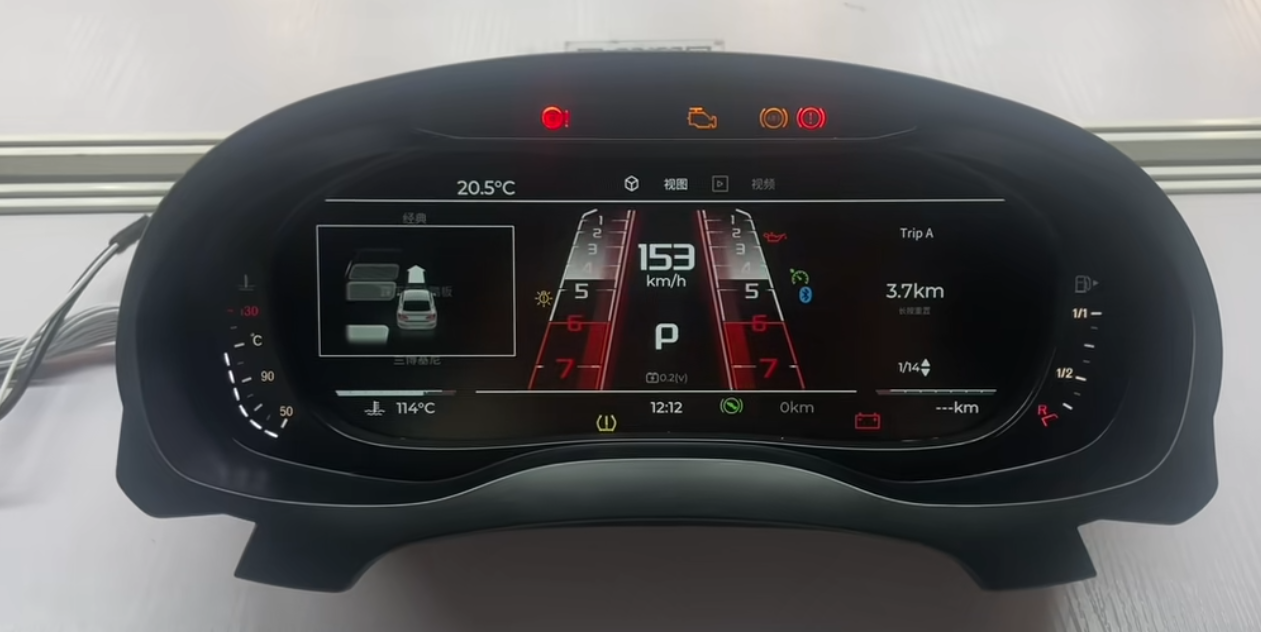
Sport-style LCD dashboard interface example.
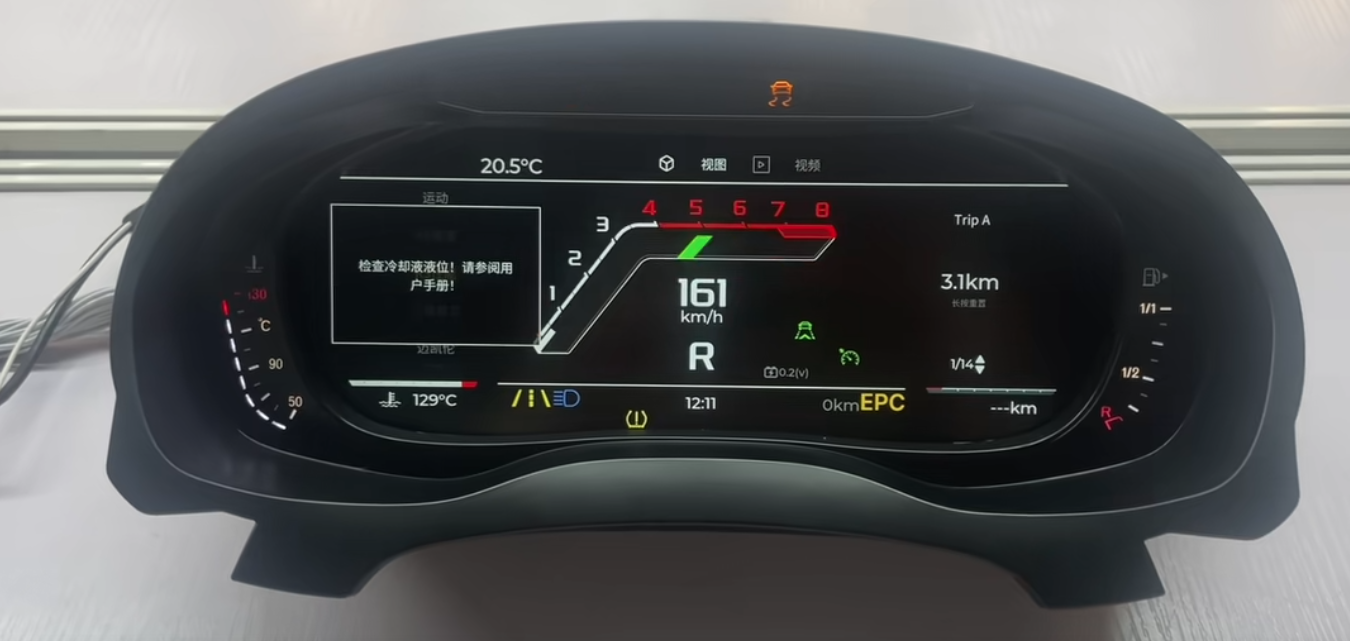
Factory-style digital dashboard interface example.
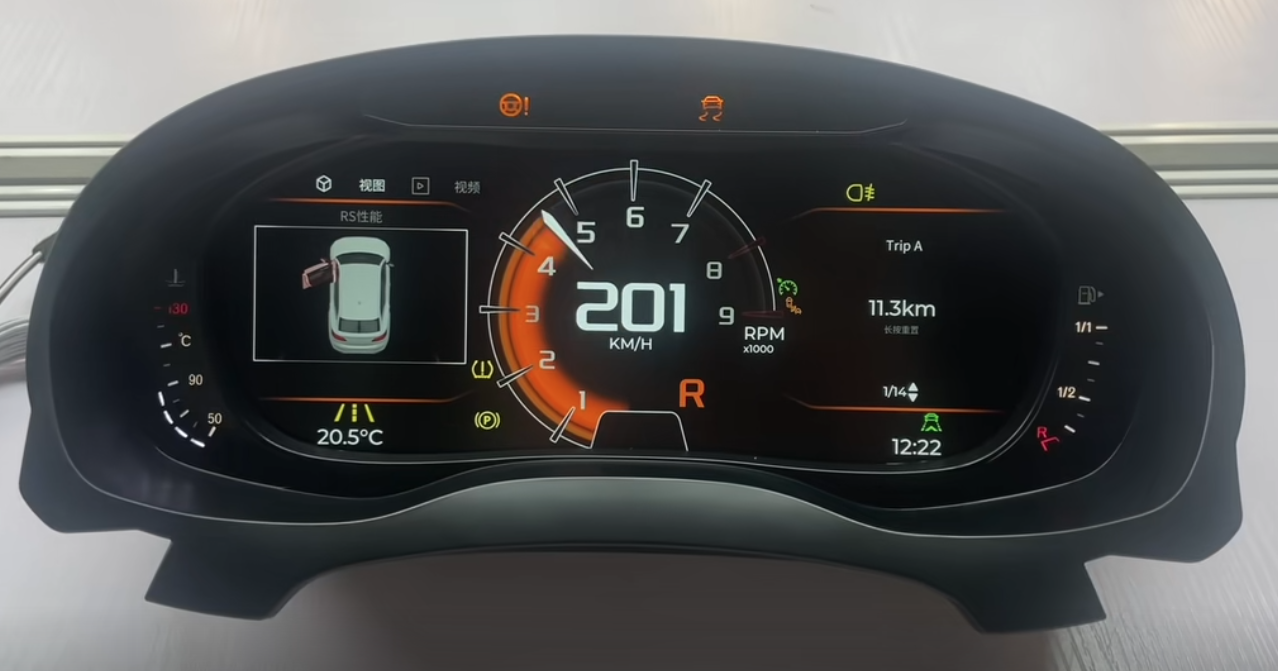
Alternative LCD dashboard interface example.
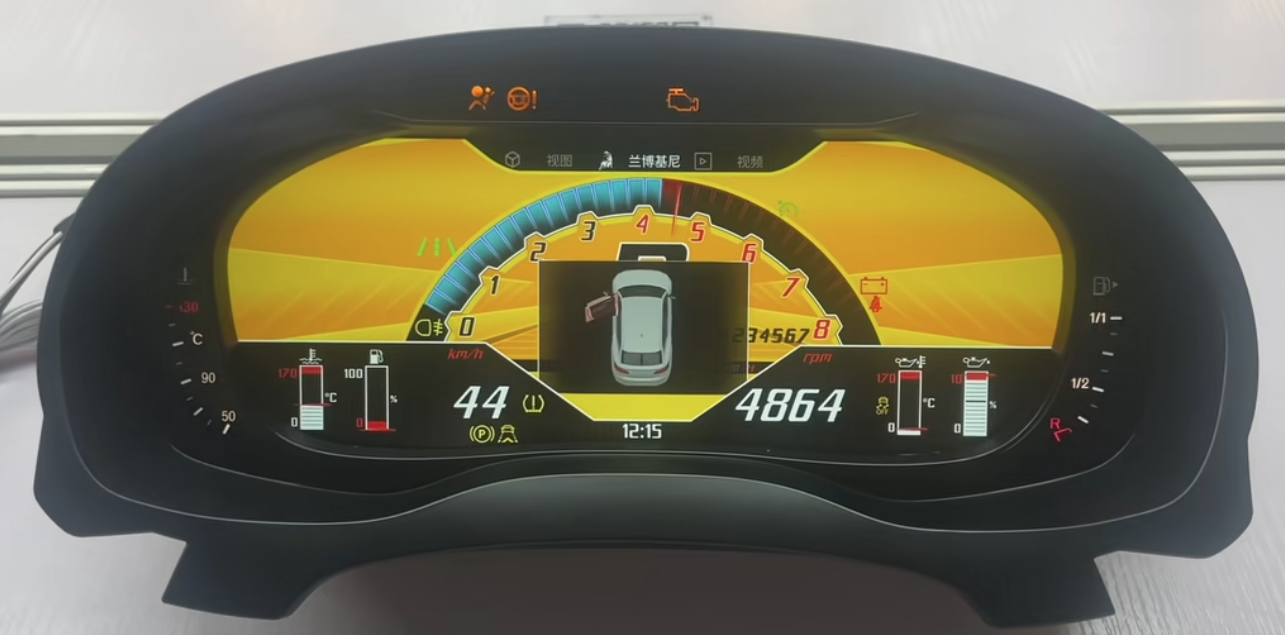
Performance-style digital dashboard interface example.
Installation and Integration Boundary
Volkswagen Digital Cluster Upgrade installation is vehicle-specific. Some supported routes use the original vehicle wiring connection without cutting or splicing the factory harness, but the installation process may still require dashboard disassembly, removal of the original cluster, original-part transfer, configuration work or final calibration checks.
What Plug-and-Play Can Mean
- The supported route uses the original vehicle wiring connection.
- The factory harness is not cut or spliced under the confirmed installation route.
- The selected unit is intended for a matching vehicle-specific configuration.
Apa Arti Plug-and-Play yang Tidak Dimaksud
- It does not mean every Volkswagen dashboard is compatible.
- It does not mean no dashboard removal or component transfer is required.
- It does not mean no setup, calibration or post-installation checks are needed.
- It does not automatically confirm CarPlay map display on the cluster.
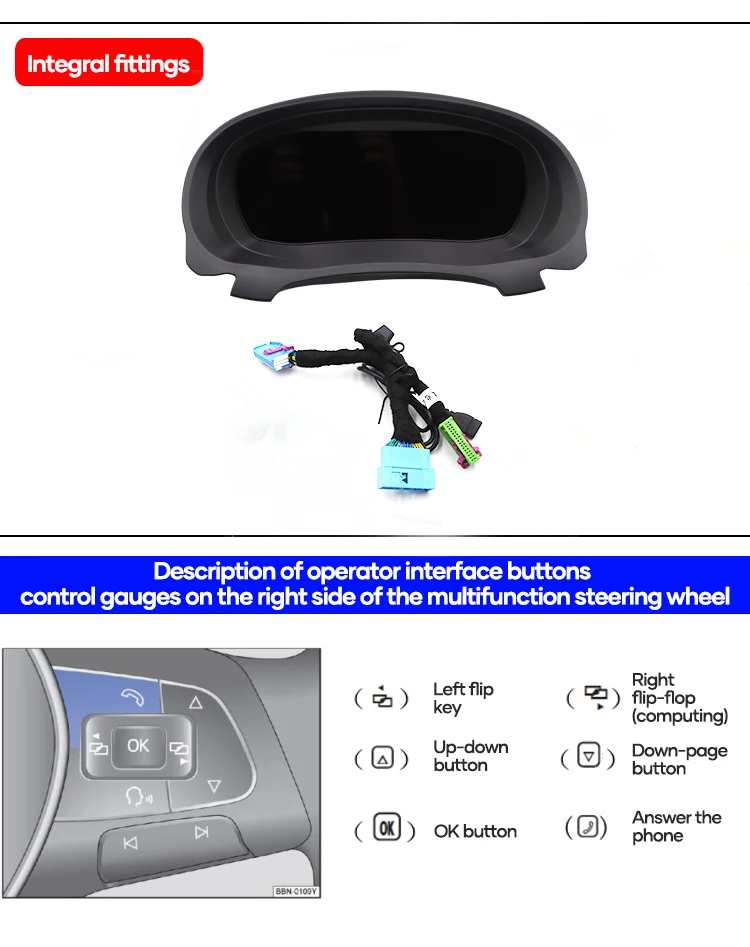
Steering-wheel control reference shown in the promotional material.
Functions to Check After Installation
- Stable screen startup and readable instrument display.
- Speed, RPM, fuel information and warning indicator behavior where supported.
- Steering-wheel menu operation where included in the selected route.
- Day/night brightness behavior and screen readability.
- CarPlay or navigation display only when the confirmed route supports it.
- Software-update access only through the correct supported system route.
Volkswagen Digital Cluster Upgrade Routes to Review
iKagoo offers Volkswagen digital instrument cluster products through model-specific routes. The examples below are browsing directions, not a universal compatibility claim.
| Rute Volkswagen | What the Buyer Should Review | Ordering Boundary |
|---|---|---|
| Passat Digital Cluster Routes | Original cluster layout, platform route, dashboard images and required functions. | Order only after matching the correct Passat-specific product route. |
| Golf Digital Cluster Routes | Vehicle generation, original analog or digital cluster baseline and connector details. | Do not assume all Golf generations use the same display unit. |
| Jetta Digital Cluster Routes | Model year, market version and original instrument panel reference. | Confirm the exact product listing before purchase. |
| Tiguan Digital Cluster Routes | Original dashboard configuration and vehicle-specific installation route. | Appearance alone is not enough to confirm fitment. |
| Polo and Other VW Routes | Product-page specifications, screen size, vehicle photos and required features. | Price and functionality may differ by product route. |
Browse the current Volkswagen Digital Cluster Upgrade collection to check available model-specific products, current prices and listed specifications: Volkswagen Digital Cluster Upgrade Collection.
CarPlay Display, Software Updates and Support Routes
Display routing and software support should be treated as separate technical decisions. A Volkswagen Digital Cluster Upgrade may provide advanced display options on a supported route, but those functions must be confirmed before ordering.
Volkswagen Digital Cluster Upgrade Collection
Browse model-specific Volkswagen digital instrument cluster products, listed features and current product-page pricing.
Browse Volkswagen Digital Cluster Upgrades →Panduan Pembelian Digital Cluster
Review the fitment evidence buyers should prepare before choosing any full LCD dashboard upgrade.
Read the Digital Cluster Guide →VW / Audi CarPlay Panduan Rute Tampilan
CarPlay connection does not automatically mean navigation maps will display in the instrument cluster.
Check the CarPlay Route →Online / USB Software Update Guide
Review supported update methods for compatible iKagoo Volkswagen and Audi digital cluster systems.
View the Update Guide →FixMyDash Software Support Service
Optional compatibility review and software-package support for eligible devices. This service does not guarantee repair of every hardware, wiring, communication or vehicle fault.
View Software Support →Pertanyaan yang Sering Diajukan
Is this page for one specific Volkswagen Digital Cluster Upgrade product?
No. This page introduces Volkswagen Digital Cluster Upgrade options and selected feature examples. Product specifications, fitment and pricing must be checked on the relevant model-specific product page.
Do all Volkswagen digital clusters use the same 12.3-inch specification?
No. The 12.3-inch specification shown here refers to a selected configuration used in the promotional material. Screen size and hardware specifications may vary by product route.
Can I choose a Volkswagen Digital Cluster Upgrade only by model name?
No. Buyers should confirm the year, original dashboard, instrument cluster layout, steering-side configuration and required functions before ordering.
Apakah Plug-and-Play berarti tidak diperlukan pekerjaan pemasangan?
No. On a supported route, plug-and-play means the factory wiring connection is used without cutting or splicing the original harness. Dashboard removal, component transfer, setup or final verification may still be required.
Will CarPlay maps automatically display on the instrument cluster?
No. Instrument-cluster map display depends on the confirmed CarPlay or projection route. Buyers who need this function should review the dedicated CarPlay display route guide first.
Why is there no fixed price displayed on this page?
Because this page covers multiple Volkswagen Digital Cluster Upgrade routes. Current pricing can differ by vehicle application, hardware configuration and availability. Use the collection or product page for the current listed price.
Does FixMyDash provide a guaranteed hardware repair warranty for these products?
No. FixMyDash is an optional software-upgrade and technical-support service route for supported devices. It does not guarantee repair of all hardware, wiring, communication, third-party modification or vehicle faults.
Choose the Right Volkswagen Digital Cluster Upgrade
Start with your exact Volkswagen model and original dashboard configuration. Then review the relevant iKagoo product page for current specifications, available functions, fitment requirements and current price before ordering.




Komentar 4
Zsolt
Volkswagen t4 2002 évjarathoz is létezik ilyen műszerfal?
És mennyibe kerül?
王者
Please contact customer service and send a photo of your original vehicle’s instrument cluster. Customer service will then help you install a digital instrument cluster.
Fabio Arana
Can be Work for VW gol g3 2005
chenjin16316
ya