Tema XStore
[teks_penjualan] 47%
  • Pemasangan Panel Instrumen Digital VW Golf Mk7: Passat B8 & Arteon
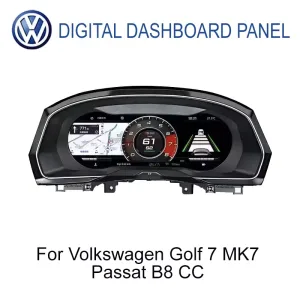
  • Cluster Instrumen Digital Volkswagen untuk Golf 7 Passat B8 CC 12,3 inci IPS LCD tampak depan
  • Golf 7
  • Passat B8
  • Panel Instrumen Digital Volkswagen untuk Golf 7, Passat B8, dan CC dengan antarmuka layar LCD IPS berukuran 12,3 inci
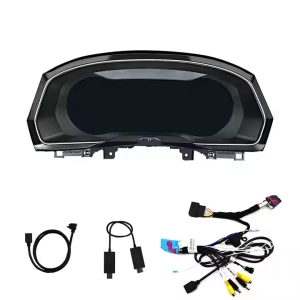
  • Aksesori Panel Instrumen Digital Volkswagen untuk Golf 7, Passat B8, dan CC, termasuk rangkaian kabel dan braket
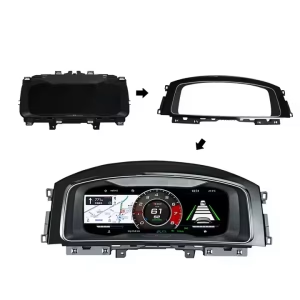
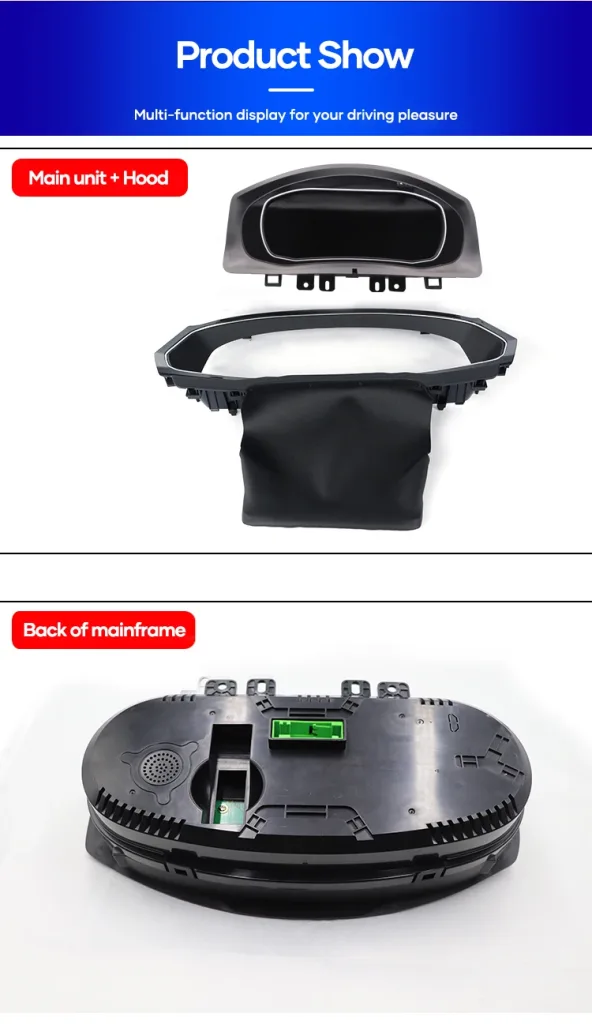
  • Bingkai pemasangan untuk Panel Instrumen Digital Volkswagen Golf 7, Passat B8, dan CC dengan layar 12,3 inci
  • Tampilan dekat panel instrumen digital Volkswagen untuk Golf 7, Passat B8, dan CC yang menampilkan panel LCD IPS berukuran 12,3 inci serta kualitas pengerjaannya
  • S6cbc90ebb0684b45b3d834f533091510r
  • S2e1af3478ae24e65bd0b46c84d8a289ej

VW Golf Mk7 Digital Cluster 2013-2020, LCD 12,3 inci (Pemasangan Ulang)

Merek:
(1 ulasan pelanggan)

Harga aslinya adalah: $785.00.Harga saat ini adalah: $418.00.

Bebas Bea Hanya untuk Uni Eropa dan Amerika Serikat
Detail
Diamankan oleh PayPal
Layanan Pembayaran Pajak DDP

Kami menangani semua PPN dan bea. Perkiraan penghematan: $120-$280.

Amerika Serikat (48 Negara Bagian)AustriaBelgiaBulgariaKroasiaSiprusCekoDenmarkEstoniaFinlandiaPrancisJermanYunaniHongariaIrlandiaItaliaLatviaLithuaniaLuksemburgMaltaBelandaPolandiaPortugalRumaniaSlovakiaSloveniaSpanyolSwedia
atau

Ada Pertanyaan?

Jangan ragu untuk Hubungi

🔥 New customers get $10 off their first order.

Beli produk 1, dapatkan diskon $10.00 untuk setiap produk
Beli produk 2, dapatkan diskon $80.00 untuk setiap produk
Bayar dengan aman dengan Paypal Bayar dengan aman dengan Visa Bayar dengan aman dengan Master Card Bayar dengan aman dengan JCB Bayar dengan aman dengan American Express Bayar dengan aman dengan Alipay Bayar dengan aman dengan Google pay Bayar dengan aman dengan Klarna Bayar dengan aman dengan DISCOVER Bayar dengan aman dengan Apple Pay
Menjamin Pembayaran Pembayaran yang Aman dan Terjamin
Perlindungan Pembeli iKAGOO

Perlindungan Pembelian untuk Produk Ini

Penilaian kompatibilitas, proses pembayaran yang aman, pengiriman dengan pelacakan, dan layanan purna jual yang memadai.

Persyaratan kelayakan, periode pelaporan, dan tindakan yang dapat diambil bergantung pada kebijakan iKAGOO yang berlaku serta hasil peninjauan kasus.

Lihat kebijakan perlindungan
VW Golf 7 / Mk7 / Mk7.5 Digital Cockpit Upgrade

VW Golf Mk7 Digital Cluster Built for a Cleaner Volkswagen Driver Display

The VW Golf Mk7 Digital Cluster upgrades the factory instrument area into a 12.3-inch LCD cockpit display for supported Golf 7, Golf Mk7 and Golf Mk7.5 vehicles. It keeps the driver-focused Volkswagen dashboard character while giving you clearer speed, RPM, warning, trip and vehicle information. Before shipment, iKAGOO checks your vehicle year, dashboard layout, LHD/RHD position and connector photos to prepare the correct version.

12.3"IPS LCD display
1920×720Wide driver view
LinuxFast cluster boot
Tingkat 3Advanced DIY path
VW Golf Mk7 Digital Cluster before and after dashboard upgrade
LCD 12,3 inciWider cockpit display
Fast BootLinux instrument system
Wheel ControlsRetained after matching
Data KendaraanSpeed, RPM, warnings
Matched InterfaceVehicle-specific route
Tidak Ada Pemotongan KawatFor supported installs
Upgrade Result

Make the Golf Mk7 Cabin Feel Newer Without Losing the Volkswagen Layout

This is not just a replacement screen. The upgrade changes the driver’s main information zone, where speed, RPM, warning status and driving data are checked every day.

More modern dashboard feeling The cluster becomes the visual center of the cockpit instead of an old analog-style panel.
Cleaner daily driving information Speed, RPM, fuel, warning and supported data are easier to read at a glance.
Prepared around your exact car iKAGOO checks year, dashboard, LHD/RHD and connector details before shipment.
VW Golf Mk7 12.3 inch digital cluster display upgrade
Jawaban Cepat

What This VW Golf Mk7 Digital Cluster Does

The VW Golf Mk7 Digital Cluster is a Linux-based 12.3-inch LCD instrument cluster retrofit for supported Volkswagen Golf 7 / Mk7 / Mk7.5 vehicles and selected MQB models after version confirmation. It upgrades the factory driver display area with clearer digital speed, RPM, driving data, warning information, theme styles and supported vehicle data. Original steering-wheel controls and vehicle information continue through the matched vehicle interface after correct installation. For map, camera or CarPlay-related screen display, the actual support route depends on the paired system and confirmed configuration, so iKAGOO checks your vehicle and connection path before shipment.

Fitment Checked Before Shipment

Golf 7, Golf Mk7, Golf Mk7.5, GTI and R models can differ by market year, dashboard trim, LHD/RHD layout and original cluster version. iKAGOO does not prepare the order by badge name alone.

Dedicated Cluster, Not a Generic Tablet

This is a dedicated instrument cluster upgrade, not a universal Android screen placed behind the steering wheel. The Linux system is used for fast startup and stable display behavior.

Tidak Ada Pemotongan Kabel yang Disengaja

For supported vehicles, the installation route is based on matched wiring and vehicle interface connection. Previous aftermarket modifications or unusual connectors should be shown to iKAGOO before installation.

Product View

Real Display, Housing and Interface Details

These product views help you understand how the VW Golf Mk7 Digital Cluster changes the driver display, how the housing fits the dashboard area and why the wiring route must be matched before shipment.

TampilanDriver view
HousingDashboard fit
HarnessMatched route

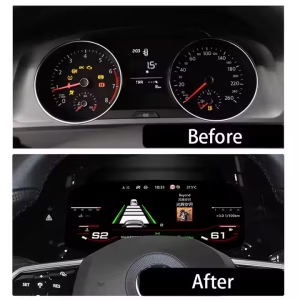
Before-and-After Cockpit Change

The old analog-style view is replaced by a wider digital layout that makes driving data easier to read. For daily commuting, long trips and night driving, the cabin feels more current without changing the basic Volkswagen dashboard position.

Golf 7 digital dashboard before and after LCD cluster retrofit

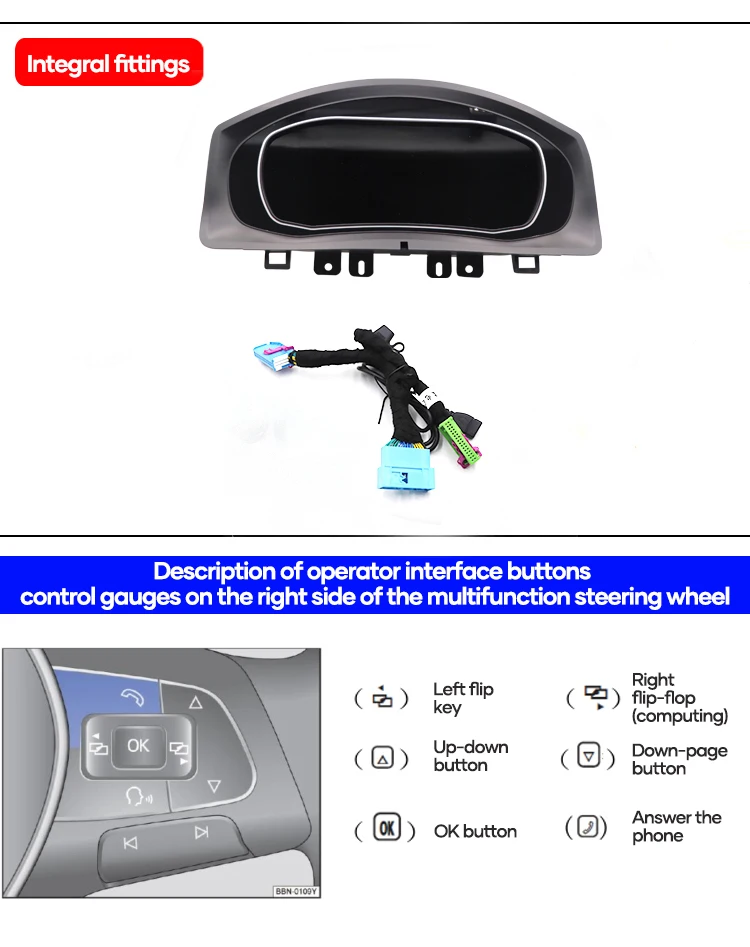
Vehicle-Specific Wiring and Interface Preparation

The cluster is supplied with vehicle-specific wiring and related interface parts for supported installations. The correct harness reduces wrong-connection risk and helps the unit communicate with the car.

VW Golf Mk7 Digital Cluster wiring harness and interface parts

Steering-Wheel Controls Continue to Feel Familiar

The original multifunction steering-wheel control logic is retained after correct connection and setup. That keeps daily operation familiar for changing pages, confirming selections and using supported cluster menus.

VW Golf Mk7 digital cluster steering wheel control support

Multiple Display Themes for Daily Driving

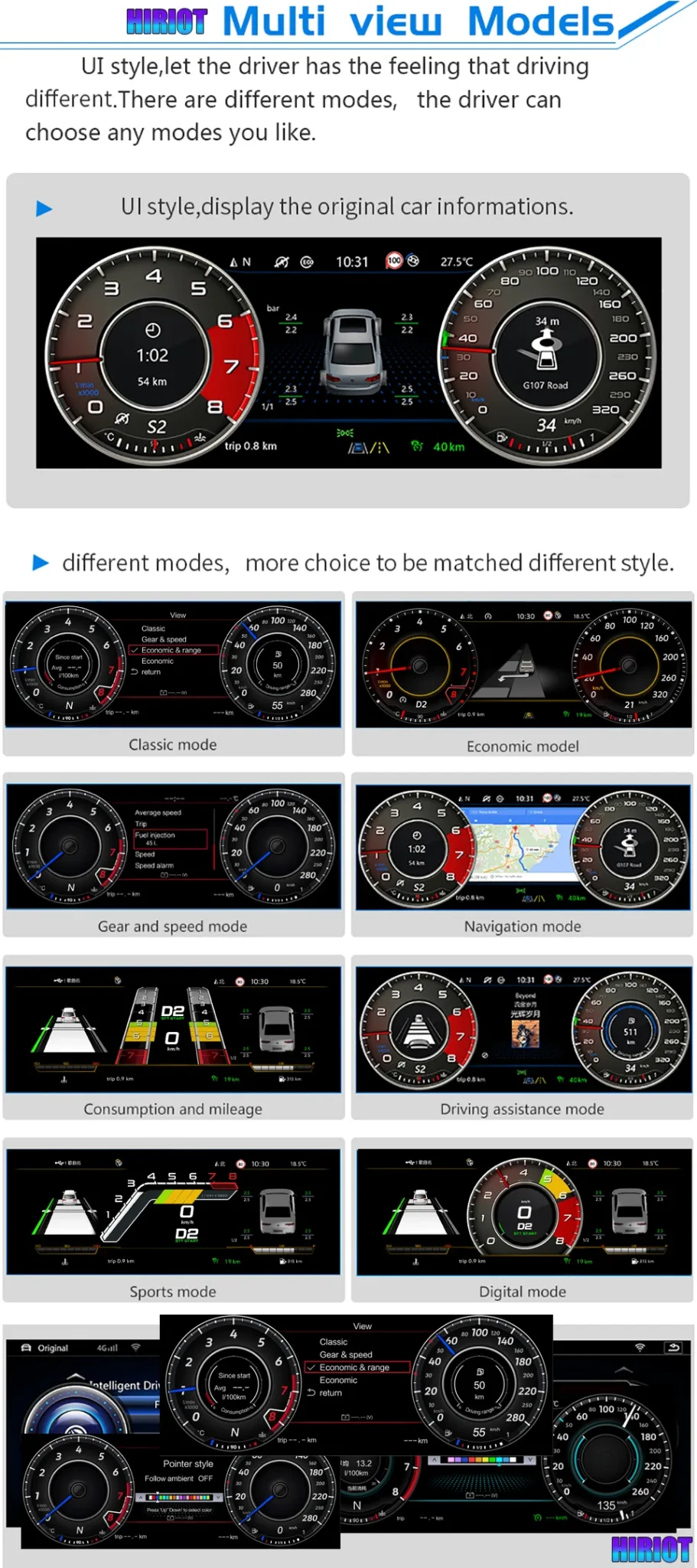
Different dial and screen layouts let you choose a display style that fits normal commuting, sport driving or navigation-focused use. The cleaner display helps the cabin feel more premium for both the driver and passengers.

VW Golf 7 digital cluster multiple display themes and navigation mode

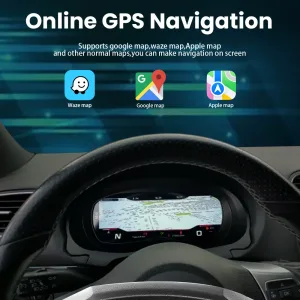
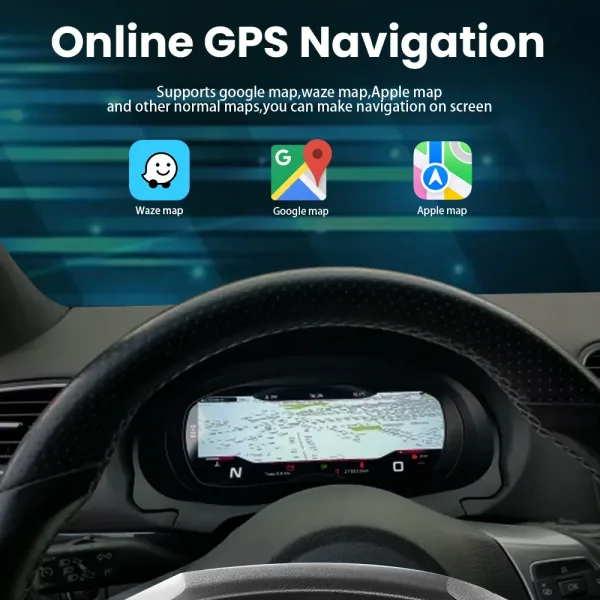
Navigation Display Path When Correctly Configured

Navigation display can be useful when the cluster is configured with the correct input and paired system route. iKAGOO should confirm the navigation, HDMI or screen-projection route for your exact configuration before shipment.

VW Golf 7 digital cluster navigation display configuration route

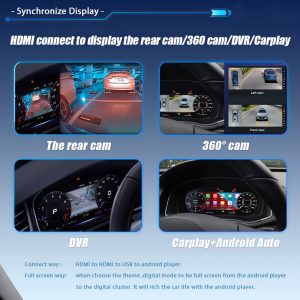
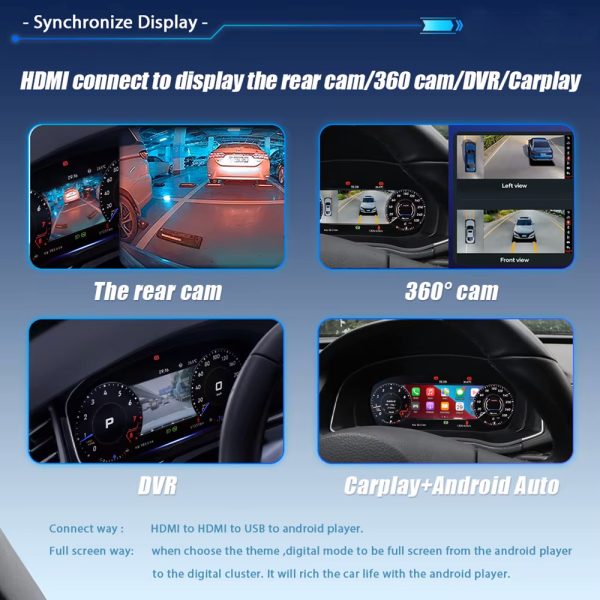
CarPlay, Camera and Screen Input Support Route

Some display functions depend on the paired Android player, HDMI input path or supported screen projection configuration. The cluster itself is a dedicated Linux instrument display, so the route should be confirmed before shipment.

VW Golf Mk7 digital cluster CarPlay camera and HDMI display support route

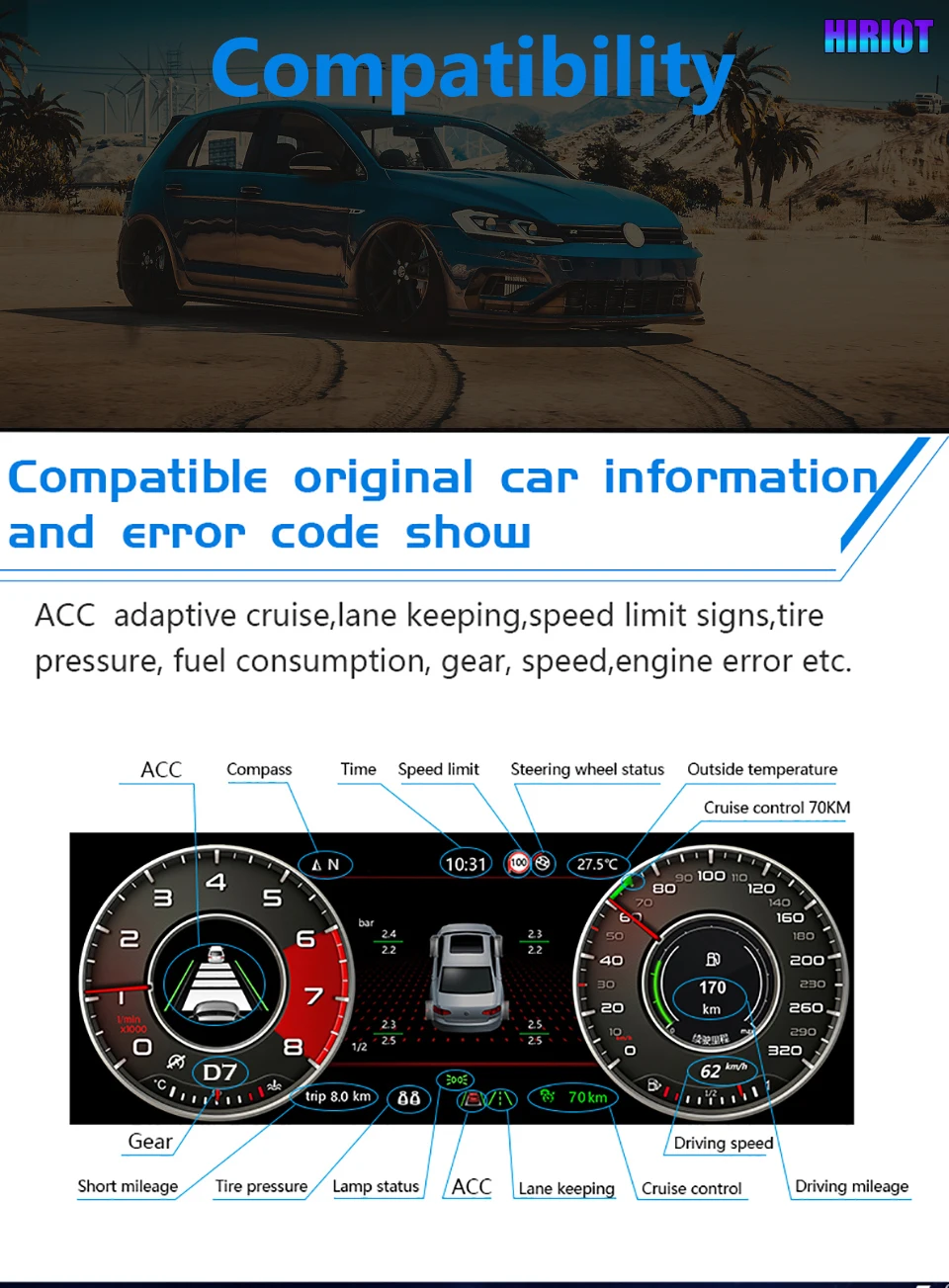
Vehicle Data and Warning Information Retained

The upgrade is designed to continue showing supported original vehicle information through the matched interface. This includes speed, gear, fuel-related data, warning indicators and other supported vehicle signals after correct installation.

VW Golf Mk7 digital instrument cluster retained vehicle data and warning information

Physical Housing and Interface Build

The rear connector area and fitted structure matter because the instrument cluster must sit correctly inside the driver-side dashboard position. iKAGOO uses your vehicle information to prepare the correct version.

VW Golf Mk7 digital instrument cluster housing and rear connector view
Spesifikasi Produk

Key Configuration for the VW Golf Mk7 Digital Cluster

These are the practical specifications that matter before ordering: screen size, vehicle direction, system type, wiring route and retained vehicle functions.

12.3"LCD
LinuxSistem
YB-116SKU
Jenis ProdukDigital Instrument Cluster / LCD Cluster Retrofit
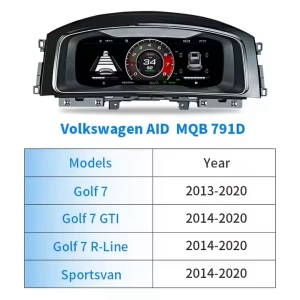
Main Vehicle DirectionVW Golf 7 / Golf Mk7 / Golf Mk7.5
Model-Year DirectionGolf 7 2013–2020; market years require confirmation
Also ConsideredPassat B8 / Arteon after dashboard and connector review
SistemOS Linux
Tampilan12.3-inch IPS LCD, 1920×720
Boot BehaviorFast startup, designed for dedicated cluster use
KontrolOriginal steering-wheel control support after matching
Data KendaraanSupported speed, RPM, gear, fuel, trip and warnings
Wiring RouteMatched harness route for supported vehicles
SKUYB-116
Best BuyerGolf Mk7 owner who wants an OEM-style digital cockpit
Cluster Digital VW Golf Mk7 Golf 7 Virtual Cockpit Retrofit 12.3-inch LCD Cluster MQB Digital Instrument Upgrade Linux Digital Dashboard
Fungsi Pabrik Tetap Dipertahankan

Fungsi Asli Kendaraan Didukung Setelah Pencocokan yang Tepat

This cluster upgrade is built around the original vehicle communication route. The exact function behavior depends on your vehicle year, original cluster, connector, LHD/RHD layout, factory system and any previous modifications.

Tombol-tombol di Setir

Supported multifunction steering-wheel controls continue to operate the cluster after correct connection and configuration.

Data Kendaraan

Supported speed, RPM, gear, fuel, mileage and driving information continue through the matched vehicle interface.

Informasi Peringatan

Supported warning indicators and vehicle status information continue to appear through the cluster communication route.

Display Input Route

Camera, 360-view, CarPlay or map display routes depend on the paired system and confirmed configuration path.

Evaluasi Produk iKAGOO

Tiga Hal yang Harus Diperiksa Sebelum Membeli

These iKAGOO standards explain upgrade value, factory-function retention and the right installation path for this VW Golf Mk7 Digital Cluster.

92Peningkatan
95Kompatibilitas
L3Install Path
iKAGOO Standar

Kebutuhan untuk Memperbarui

92/100
Alasan Kuat untuk Melakukan Upgrade
Low ValueStrong Value

This score explains why the upgrade makes sense for daily use, not only whether the dashboard looks modern.

Driver visibility
Cabin modernization
Ownership value
  • The instrument cluster is the driver’s most-used display area.

  • The 12.3-inch LCD gives clearer digital driving information.
  • It is more complete than a basic CarPlay-only module because it changes the driver cockpit display.
Baca Standar Kebutuhan Pembaruan iKAGOO
iKAGOO Standar

Kompatibilitas dengan Kendaraan Asli

95/100
Strong Function Retention
Generic FitKhusus Kendaraan

A score of 95/100 does not mean that 5% of factory functions are lost. It explains the matching route, control retention and vehicle-specific preparation.

Kontinuitas fungsi pabrik
Kelangsungan kontrol asli
Vehicle data integration
Kesesuaian arsitektur fisik
Factory-style interaction
Integrasi perangkat keras
  • Supported vehicle data and warnings continue through the matched route.
  • Steering-wheel controls continue through the supported control path.
  • Matched wiring reduces wrong-connection risk before international shipment.
Baca Standar Kompatibilitas Kendaraan Asli iKAGOO
iKAGOO Standar

Tingkat Kemudahan Pemasangan

Tingkat 3
Proyek DIY Tingkat Lanjut
DasarAhli
L1 L2 L3 L4 L5

This level is suitable for experienced DIY installers or an automotive electronics installer.

Trim removal care
Harness connection
Pengujian fungsi
  • Requires careful trim and cluster removal.
  • Requires matched wiring connection and vehicle-interface setup.
  • No intentional cutting of supported factory wiring is planned for supported installations.
Baca Standar Tingkat Kemudahan Pemasangan iKAGOO
Mengapa Membeli dari iKAGOO

Correct Version Preparation Matters More Than a Cheap Listing Photo

Digital clusters are not selected by model name alone. iKAGOO prepares the version around vehicle year, dashboard layout, factory cluster, connector, LHD/RHD position and your requested display route.

Vehicle Details Checked

You send the model year, dashboard photo, current instrument cluster photo, steering wheel photo and connector details when needed. This helps iKAGOO prepare the correct screen and interface path.

Harness and Interface Prepared

The matched wiring route is important for steering controls, vehicle data and supported warning information. The goal is a cleaner connection path without intentionally cutting supported factory wiring.

Dukungan Pasca Pembayaran

After the order, iKAGOO can review setup issues, wiring photos, videos, version information and function behavior. Cases beyond normal setup can enter engineer-level judgment.

Setelah Anda Memesan

How iKAGOO Supports This Upgrade After Payment

The order process is built to reduce wrong-version risk, prepare the correct vehicle-specific parts and give your installer a usable support route if the vehicle has a special configuration.

Langkah 1

Order Record Created

Your order number becomes the reference for vehicle review, packing, delivery and support.

Langkah 2

Ulasan Kendaraan

iKAGOO checks your model year, dashboard layout, LHD/RHD position and current cluster information.

Langkah 3

Correct Version Prepared

The screen, harness, interface and configuration route are prepared according to the vehicle information.

Langkah 4

Foto Produk Jika Diminta

If requested before packing, you can ask to see actual visible parts prepared for your order.

Langkah 5

Pengemasan dan Pengiriman

After confirmation, the order is packed and dispatched with tracked international delivery.

Langkah 6

Pelacakan dan Tindak Lanjut

Tracking may update through international and local carriers. iKAGOO can request logistics updates if needed.

Langkah 7

Dukungan Pemasangan

If your installer needs help, iKAGOO may request photos, videos, wiring status and function test results.

Langkah 8

Eskalasi Insinyur

Cases beyond normal setup can be escalated with useful evidence for technical judgment.

Langkah 9

Software or Settings Path

If settings, firmware or configuration guidance is involved, iKAGOO coordinates the suitable technical route after confirmation.

Langkah 10

Masalah Kabel atau Aksesori

If a confirmed cable or accessory problem appears, iKAGOO helps arrange the approved solution or replacement route.

Langkah 11

Hardware Compatibility Case

If confirmed hardware incompatibility remains after checks, iKAGOO follows the applicable order and return policy for the device itself.

Langkah 12

Setelah Berhasil

You can still contact iKAGOO for applicable maintenance, setup, update or troubleshooting guidance.

Bandingkan Pilihan Upgrade Anda

Why This Route Makes More Sense Than a Generic Dashboard Fix

The right choice depends on whether you only want the old display repaired, a phone connection added, or a real driver-display upgrade.

Perbaiki Kluster Lama

Repair may keep the car original, but it does not modernize the cockpit or add a wider digital driver information layout. It can be reasonable for collectors, but less attractive for daily-use upgrades.

Cheap Universal Screen

A universal product may look cheaper at first, but it often creates fitment, wiring and support uncertainty. The risk is higher when the product is selected only from a photo instead of vehicle details.

iKAGOO VW Golf Mk7 Digital Cluster

This route focuses on a vehicle-specific instrument display, matched wiring, retained controls and pre-shipment fitment review. It is the better direction for owners who want a cleaner Golf Mk7 cockpit upgrade with support after purchase.

Informasi Kendaraan yang Diperlukan

Sebelum Pengiriman

  • Model kendaraan dan tahun model
  • Golf 7 / Mk7 / Mk7.5 / GTI / R identification
  • LHD or RHD position
  • Dashboard and current cluster photos
  • Connector photos if requested

Sebelum Pemasangan

  • Check all visible connectors
  • Confirm the matched harness route
  • Test steering-wheel controls before final assembly
  • Test warning information and vehicle data
  • Stop if any plug shape is not correct

Setelah Instalasi

  • Test speed, RPM, fuel and gear display
  • Test warning indicators
  • Test theme switching and cluster menus
  • Check navigation or input route if configured
  • Send video to iKAGOO if support is needed
Shipping, Warranty and Policy Links

Order Protection and Support References

These links help buyers verify how iKAGOO handles compatibility, installation preparation, warranty coverage, returns and long-term support before ordering.

Kebijakan Garansi

Check the warranty terms for eligible hardware, support process and order-number reference requirements.

Baca Kebijakan Garansi

Refunds and Returns

Review the return route, confirmed compatibility cases and order-protection conditions before installation.

Read Refund and Returns
Pertanyaan Umum

Pertanyaan yang Sering Diajukan

These answers are written for Golf Mk7 owners who want to avoid wrong-version ordering, unclear installation routes and unsupported function expectations.

Will this VW Golf Mk7 Digital Cluster fit my exact car?

It depends. The main direction is Golf 7 / Golf Mk7 / Golf Mk7.5, but final fitment depends on your vehicle year, dashboard layout, LHD/RHD position, original cluster and connector route. Send clear photos before shipment so iKAGOO can prepare the correct version.

Is this only for Golf Mk7, or also for Passat B8 and Arteon?

It depends. Golf Mk7 is the primary page direction, while Passat B8 and Arteon should be handled as confirmed MQB-related applications. iKAGOO checks dashboard structure and connector information before treating those vehicles as supported for your order.

Apakah tombol-tombol di setir asli masih berfungsi?

Yes, after correct matching and connection. Supported multifunction steering-wheel controls continue through the matched vehicle interface. Final behavior should be tested before the dashboard is fully reassembled.

Will vehicle data and warning information still show?

Yes, supported vehicle data and warning information continue through the cluster communication route after correct installation. This includes core driving information such as speed, RPM, gear, fuel-related data and supported warning status.

Does it support map navigation or CarPlay display?

It depends. The cluster is a dedicated Linux instrument display and does not run Android apps by itself. Map, CarPlay, Android Auto, camera or 360-view display depends on the paired system, HDMI or screen-projection route and the confirmed configuration.

Apakah saya perlu memotong kabel bawaan pabrik?

No, supported installations are prepared around a matched wiring route without intentional cutting of supported factory wiring. If your vehicle has previous aftermarket wiring, damaged plugs or non-standard connectors, stop and contact iKAGOO before continuing.

Apakah produk ini cocok untuk pemasangan sendiri?

It depends. The iKAGOO Installation Ease Level is Level 3 — Advanced DIY. It is suitable for experienced DIY installers or an automotive electronics installer who can remove trim carefully, connect the matched harness and complete full function testing.

Does it require ODIS or dealer coding?

It depends on the vehicle and configuration. Many supported functions work through the matched cluster and interface route, but special configurations may need setup guidance. iKAGOO reviews your vehicle details so the correct support path is prepared before shipment.

Apa saja yang harus saya kirimkan sebelum pengiriman?

Send the vehicle model, model year, dashboard photo, current instrument cluster photo, steering-wheel photo, LHD/RHD information and connector photos if requested. These details help iKAGOO prepare the correct version instead of relying only on the vehicle badge name.

Mengapa membeli dari iKAGOO daripada produk generik yang lebih murah?

Because the real risk is not only price; it is ordering the wrong version, receiving the wrong harness or having no support after installation starts. iKAGOO provides vehicle review, version preparation, tracked delivery and practical installation support for this VW Golf Mk7 Digital Cluster upgrade.

Bolehkah saya meminta foto produk aslinya sebelum dikemas?

Yes, if requested before packing. You can ask iKAGOO to show visible prepared parts, harnesses or related accessories before dispatch. This helps you and your installer feel more confident before international shipping begins.

Bagaimana jika teknisi pemasang saya menemukan masalah pada kabel atau pengaturan?

Contact iKAGOO with clear photos, videos, connector status and a description of the function that is not working. iKAGOO uses that information to check wiring, settings, CANBUS route, cluster version and whether engineer-level review is needed.

Catatan Akhir untuk Pembelian

Choose This Upgrade If You Want a Real Driver-Cockpit Change

The VW Golf Mk7 Digital Cluster is for owners who want the instrument area to feel newer, clearer and more useful every day. It is strongest when the buyer provides accurate vehicle information, iKAGOO prepares the correct version, and the installer completes full function testing before final assembly.

5.00

Berdasarkan ulasan 1
1
0
0
0
0

Ulasan 1 untuk VW Golf Mk7 Digital Cluster 2013-2020 12.3-inch LCD Retrofit

  1. James Parker -

    Peringkat total
    Nilai untuk uang

    Saya telah memasang panel instrumen digital Ikagoo di mobil Golf 7 tahun 2015 milik saya. Pemasangannya cukup mudah, dan tampilan layarnya terlihat modern. Integrasi CarPlay nirkabelnya berjalan lancar, dan tema-tema yang dapat disesuaikan menambah sentuhan pribadi. Secara keseluruhan, ini adalah peningkatan yang sangat layak.

    Apakah ini membantu?
Tambahkan ulasan
Pengiriman, garansi, pengembalian barang, dan layanan pelanggan iKAGOO
Layanan Pelanggan iKAGOO

Pengiriman, Garansi, dan Pengembalian Barang

Informasi yang jelas mengenai pemrosesan pesanan, pengiriman internasional, produk khusus kendaraan, layanan garansi, pengembalian barang, dan kiriman yang rusak.

Pemrosesan pesanan Biasanya 1–3 hari kerja sebelum pengiriman.
Pengiriman internasional Biasanya 5–20 hari kerja setelah pengiriman, tergantung pada tujuan.
Garansi perangkat keras Garansi terbatas selama 12 bulan untuk cacat produksi yang memenuhi syarat.
Dukungan khusus untuk kendaraan Tersedia layanan bantuan terkait kompatibilitas, pemasangan kabel, dan konfigurasi.

Pertanyaan yang Sering Diajukan

Jawaban-jawaban ini memberikan ringkasan praktis. Halaman kebijakan lengkap yang tertaut di bawah ini berlaku untuk semua pesanan.

01

Dari mana pesanan dikirim, dan berapa lama waktu pengirimannya?

Sebagian besar pesanan iKAGOO dikirim dari pusat pemenuhan pesanan kami di Tiongkok setelah konfigurasi produk dan informasi kendaraan telah diverifikasi. Proses pemenuhan pesanan biasanya memakan waktu sekitar 1-3 hari kerja.

Perkiraan waktu pengiriman setelah barang dikirim adalah:

  • Amerika Serikat dan Kanada: sekitar 5–9 hari kerja
  • Uni Eropa: sekitar 7–15 hari kerja
  • Inggris Raya dan Australia: sekitar 7–10 hari kerja
  • Wilayah lain yang didukung: sekitar 7–20 hari kerja

Perkiraan waktu pengiriman dapat dipengaruhi oleh proses bea cukai, hari libur lokal, pengiriman ke daerah terpencil, kondisi cuaca, atau keterlambatan dari pihak kurir.

02

Apakah saya harus membayar pajak impor, PPN, atau biaya bea cukai?

Pengiriman internasional standar biasanya tidak mencakup PPN negara tujuan, bea masuk, biaya jasa perantara, atau biaya kepabeanan.

Untuk tujuan di Uni Eropa yang memenuhi syarat, sebuah opsi Layanan pengiriman DDP mungkin tersedia. Biaya-biaya terkait impor hanya akan dimasukkan jika opsi DDP dipilih saat proses pembayaran atau dikonfirmasi oleh iKAGOO secara tertulis sebelum pengiriman.

Apabila opsi DDP tidak dipilih, penerima bertanggung jawab atas segala biaya yang dikenakan oleh bea cukai setempat atau perusahaan pengiriman.

03

Apakah saya bisa memesan pengiriman ekspres?

Layanan pengiriman ekspres atau cepat mungkin tersedia untuk produk dan tujuan tertentu. Ketersediaan layanan, perusahaan pengiriman, dan biaya tambahan akan dikonfirmasi sebelum pengiriman.

Tergantung pada tujuan dan jenis produk, iKAGOO mungkin menggunakan jasa pengiriman seperti DHL, FedEx, UPS, EMS, 4PX, atau penyedia jasa logistik lain yang menyediakan layanan pelacakan.

04

Bagaimana cara melacak kiriman saya?

Setelah pesanan dikirim, nomor pelacakan atau tautan pelacakan biasanya akan dikirimkan ke alamat email yang digunakan untuk pesanan tersebut.

Pembaruan pelacakan mungkin memerlukan waktu beberapa hari kerja untuk muncul saat sebuah paket dipindahkan dari satu operator pengiriman internasional ke operator pengiriman lokal.

05

Bagaimana kebijakan pengembalian dan pengembalian dana iKAGOO?

Kelayakan pengembalian bergantung pada alasan pengembalian, kondisi produk, status pemasangan, bukti yang disertakan, serta apakah pengembalian tersebut telah disetujui oleh iKAGOO.

Untuk pengembalian barang yang tidak cacat, produk tersebut biasanya harus dalam kondisi belum pernah digunakan, belum dipasang, lengkap, dan layak untuk dijual kembali. Pelanggan umumnya bertanggung jawab atas biaya pengiriman pengembalian yang telah disetujui.

Biaya pengiriman awal, biaya DDP, PPN, bea masuk, dan biaya logistik lainnya umumnya tidak dapat dikembalikan, kecuali jika diwajibkan oleh undang-undang yang berlaku atau dikonfirmasi sebaliknya oleh iKAGOO.

Jangan mengembalikan produk sebelum menerima alamat pengembalian yang telah disetujui dan petunjuk pengembalian dari iKAGOO.

06

Apa yang terjadi jika iKAGOO telah mengonfirmasi kompatibilitasnya, tetapi produk tersebut tidak dapat diinstal?

Perlindungan tambahan mungkin berlaku jika iKAGOO telah memastikan kompatibilitasnya sebelum pembelian, pelanggan memberikan informasi kendaraan yang akurat, dan pelanggan bersedia mengikuti langkah-langkah pemasangan serta diagnostik yang wajar.

Jika iKAGOO memastikan bahwa tidak ada solusi teknis yang wajar yang tersedia, dan masalah tersebut dilaporkan dalam waktu 7 hari kalender setelah pengiriman, , pelanggan mungkin berhak mendapatkan pengembalian dana sebesar harga produk tanpa diwajibkan mengembalikan produk tersebut.

Biaya pengiriman awal, DDP, PPN, bea masuk, dan biaya pihak ketiga lainnya tidak termasuk dalam pengembalian dana harga produk ini.

07

Garansi apa saja yang ditawarkan oleh iKAGOO?

Produk iKAGOO yang memenuhi syarat antara lain: Garansi perangkat keras terbatas selama 12 bulan mencakup cacat produksi yang telah diverifikasi serta kerusakan perangkat keras yang memenuhi syarat dalam kondisi penggunaan normal.

Tergantung pada masalahnya, solusinya dapat berupa diagnosis jarak jauh, bantuan konfigurasi, suku cadang pengganti, perbaikan, penggantian produk, pengembalian dana sebagian, atau pengembalian dana penuh.

Garansi ini biasanya tidak mencakup kerusakan yang disebabkan oleh pemasangan kabel yang salah, modifikasi tanpa izin, kerusakan akibat kecelakaan, masuknya air, benturan, penyalahgunaan, tegangan yang tidak sesuai, kesalahan pemasangan, atau peralatan pihak ketiga yang tidak kompatibel.

08

Apakah membuka kemasan produk secara otomatis membatalkan garansi?

Pemeriksaan atau pengujian oleh pihak ketiga tidak secara otomatis membatalkan seluruh garansi. Namun, kerusakan yang disebabkan oleh perbaikan yang tidak sah, penggantian komponen, modifikasi yang tidak tepat, sirkuit yang putus, atau perakitan ulang yang tidak benar tidak tercakup dalam garansi.

Hubungi iKAGOO sebelum membongkar atau memperbaiki produk agar prosedur diagnostik yang tepat dapat diberikan.

09

Bagaimana jika pesanan saya tiba dalam kondisi rusak atau ada bagian yang hilang?

Hubungi iKAGOO dalam waktu 7 hari kalender setelah pengiriman dan simpan kemasan asli, label pengiriman, aksesori, serta produknya.

Mohon berikan foto atau video yang jelas yang memperlihatkan:

  • Kotak pengiriman eksternal dan label pengiriman
  • Adanya kerusakan pada kemasan yang terlihat
  • Produk dan area yang terkena dampak
  • Semua aksesori dan kabel yang diterima

Setelah dilakukan verifikasi, iKAGOO dapat mengatur pengiriman suku cadang yang hilang, penggantian, perbaikan, pengembalian dana, atau solusi lain yang wajar sesuai dengan kasus yang bersangkutan.

10

Apa yang harus saya lakukan jika saya memesan produk yang salah?

Hubungi iKAGOO sebelum memasang atau menggunakan produk ini. Permohonan penukaran atau pengembalian barang mungkin dapat disetujui asalkan produk tersebut belum pernah digunakan, belum dipasang, masih lengkap, dan layak untuk dijual kembali.

Pelanggan biasanya bertanggung jawab atas biaya pengiriman dan selisih harga apa pun jika produk, model kendaraan, tahun produksi, atau konfigurasi pabrik yang dipilih salah.

Label pengembalian prabayar gratis tidak diberikan secara otomatis.

11

Apakah saya bisa mengubah atau membatalkan pesanan saya setelah melakukan pembayaran?

Segera hubungi iKAGOO, sebaiknya dalam waktu 12 jam setelah melakukan pemesanan, saat mengajukan permintaan terkait alamat, konfigurasi kendaraan, atau perubahan produk.

Perubahan atau pembatalan tidak berlaku sampai dikonfirmasi oleh iKAGOO. Produk khusus kendaraan mungkin akan memasuki tahap pengadaan, pemrograman, pengujian, konfigurasi, atau persiapan khusus segera setelah pembayaran dilakukan.

Setelah proses persiapan atau pengiriman dimulai, pembatalan mungkin tidak dapat dilakukan, atau biaya wajar yang telah dikeluarkan mungkin akan dipotong.

12

Apa saja yang termasuk dalam paket?

Isi kemasan bervariasi tergantung pada produk, model kendaraan, sistem pabrik, dan konfigurasi yang dipilih.

Tergantung pada produknya, kemasan mungkin berisi perangkat utama, kabel-kabel khusus kendaraan, antarmuka CANBUS, adaptor, kabel USB, antena, mikrofon, perangkat pemasangan, dan aksesori pemasangan lainnya.

Silakan lihat halaman produk yang bersangkutan, foto kemasan, dan konfirmasi pesanan untuk mengetahui komponen-komponen yang termasuk secara tepat.

13

Bagaimana cara menghubungi layanan dukungan iKAGOO?

Anda dapat menghubungi iKAGOO melalui formulir kontak, email, WhatsApp, atau saluran dukungan situs web yang tersedia. Waktu respons biasanya dalam waktu 24 jam kerja.

Agar layanan dukungan teknis lebih cepat, cantumkan nomor pesanan, model dan tahun kendaraan, foto sistem pabrik, foto produk, serta video yang jelas yang memperlihatkan masalahnya.

Kunjungi: Kontak dan Dukungan iKAGOO

14

Apakah pembayaran aman, dan apakah tersedia opsi cicilan?

Pembayaran diproses melalui metode pembayaran aman yang ditampilkan saat proses checkout. Pilihan kartu, dompet digital, dan cicilan yang tersedia dapat bervariasi tergantung pada negara, mata uang, penyedia layanan pembayaran, dan kelayakan pelanggan.

Setiap layanan cicilan, termasuk opsi yang ditawarkan oleh PayPal atau penyedia layanan lainnya, tergantung pada ketersediaan di wilayah tertentu dan ketentuan persetujuan dari penyedia layanan tersebut.

Baca Kebijakan iKAGOO Selengkapnya

Harap baca halaman kebijakan selengkapnya sebelum memesan, terutama terkait produk khusus kendaraan, ketentuan pajak internasional, dan pengembalian barang yang berkaitan dengan pemasangan.

FAQ ini merupakan panduan sederhana bagi pelanggan. Halaman kebijakan lengkap yang telah dipublikasikan, konfirmasi pesanan, dan undang-undang perlindungan konsumen yang berlaku akan menjadi acuan utama jika terdapat perbedaan redaksional.

Pemasangan Panel Instrumen Digital VW Golf Mk7: Passat B8 & Arteon VW Golf Mk7 Digital Cluster 20...

Harga aslinya adalah: $785.00.Harga saat ini adalah: $418.00.

Tambah ke keranjang