


Kecepatan Digital dan RPM yang Jelas
Pengukur digital dan grafis berukuran besar membuat informasi kecepatan dan mesin lebih mudah dikenali tanpa harus bergantung pada layar informasi kecil di bagian tengah.

| Berat | 8 kg |
|---|---|
| Dimensi | 48 × 38 × 28 cm |
| Mobil Pendukung | 2015–2018 untuk Toyota Highlander, 2018–2019 untuk Toyota Highlander |
| Kompatibilitas produk | Plug and play |
| Asal produk | Bukan produk asli |


$780.00 Harga aslinya adalah: $780.00.$680.00Harga saat ini adalah: $680.00.

Kami menangani PPN dan bea masuk yang berlaku untuk pesanan dari Uni Eropa dan Amerika Serikat yang memenuhi syarat. Perkiraan penghematan: $120-$280 .
Biaya pengiriman ditagih terpisah. Biaya pengiriman yang tepat dihitung berdasarkan tujuan dan ditampilkan di keranjang belanja Anda sebelum melakukan pembayaran.
Pengiriman final dikonfirmasi dari alamat pengiriman Anda saat checkout.
Penilaian kompatibilitas, perlindungan kompatibilitas penuh, garansi perangkat keras selama 12 bulan, serta dukungan berkelanjutan setelah pemasangan.
 Perlindungan Pengembalian Dana Penuh
Jaminan Kompatibilitas
Sudah dipastikan tidak kompatibel dengan kendaraan Anda? Anda akan mendapatkan pengembalian dana penuh.
→
Perlindungan Pengembalian Dana Penuh
Jaminan Kompatibilitas
Sudah dipastikan tidak kompatibel dengan kendaraan Anda? Anda akan mendapatkan pengembalian dana penuh.
→
 12-Month Garansi Perangkat Keras
Garansi perangkat keras berlaku selama 12 bulan pertama.
→
Dukungan Purna Jual Jangka Panjang
Panduan perangkat lunak, dukungan suku cadang, dan koordinasi perbaikan tetap terhubung dengan pesanan awal Anda.
→
12-Month Garansi Perangkat Keras
Garansi perangkat keras berlaku selama 12 bulan pertama.
→
Dukungan Purna Jual Jangka Panjang
Panduan perangkat lunak, dukungan suku cadang, dan koordinasi perbaikan tetap terhubung dengan pesanan awal Anda.
→
Tujuan kami adalah memastikan pesanan Anda benar sebelum dikirim. Kami memverifikasi kompatibilitas, menyiapkan pengaturan yang benar, dan menghubungi Anda hanya jika ada yang perlu konfirmasi.
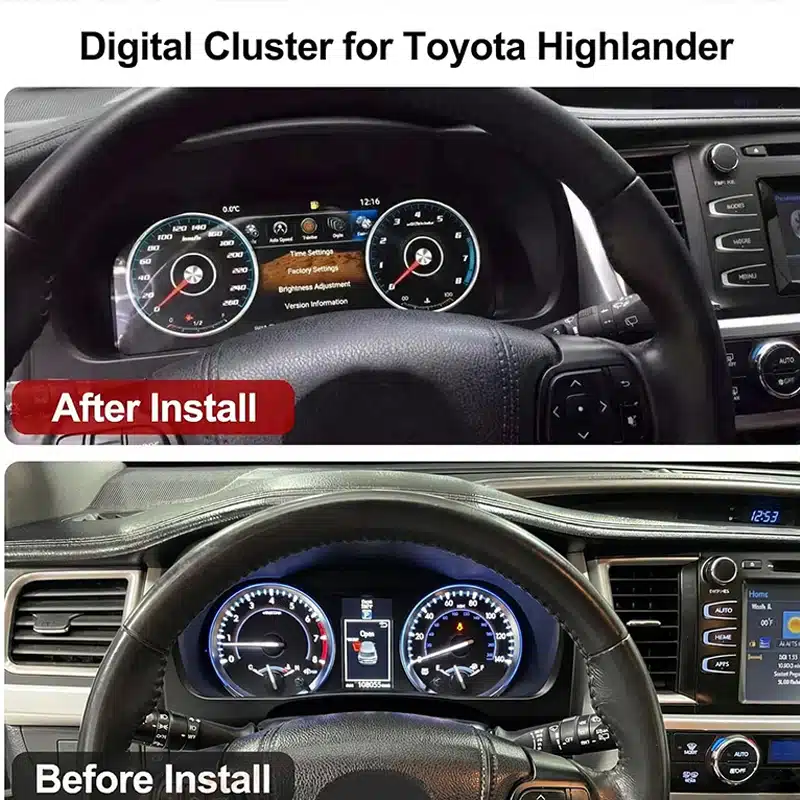
Peningkatan Kokpit Digital Khusus Kendaraan iKAGOO
Itu Panel instrumen digital Toyota Highlander menggantikan rakitan panel instrumen tradisional dengan layar Linux berukuran lebar 12,3 inci beresolusi 1920×720, sehingga memberikan Highlander Anda kabin yang lebih rapi dan modern yang berfokus pada pengemudi.
Lihat kecepatan, RPM, jarak tempuh, informasi perjalanan, data bahan bakar, tekanan ban, serta peringatan kendaraan yang didukung melalui antarmuka digital yang jelas dan lebih mudah dibaca saat berkendara sehari-hari.
Ini adalah pembaruan lengkap untuk panel instrumen. Pembaruan ini tidak menggantikan radio di bagian tengah dan bukan modul khusus CarPlay, sehingga Anda dapat memperbarui tampilan pengemudi tanpa perlu mengganti seluruh sistem infotainment Anda.
Layar lebar beresolusi 1920×720 memberikan ruang yang lebih luas untuk informasi berkendara dan meningkatkan visibilitas dari kursi pengemudi.
Lihat informasi mengenai kecepatan, RPM, jarak tempuh, perjalanan, bahan bakar, tekanan ban, dan peringatan dalam satu layar yang dirancang khusus untuk pengemudi.
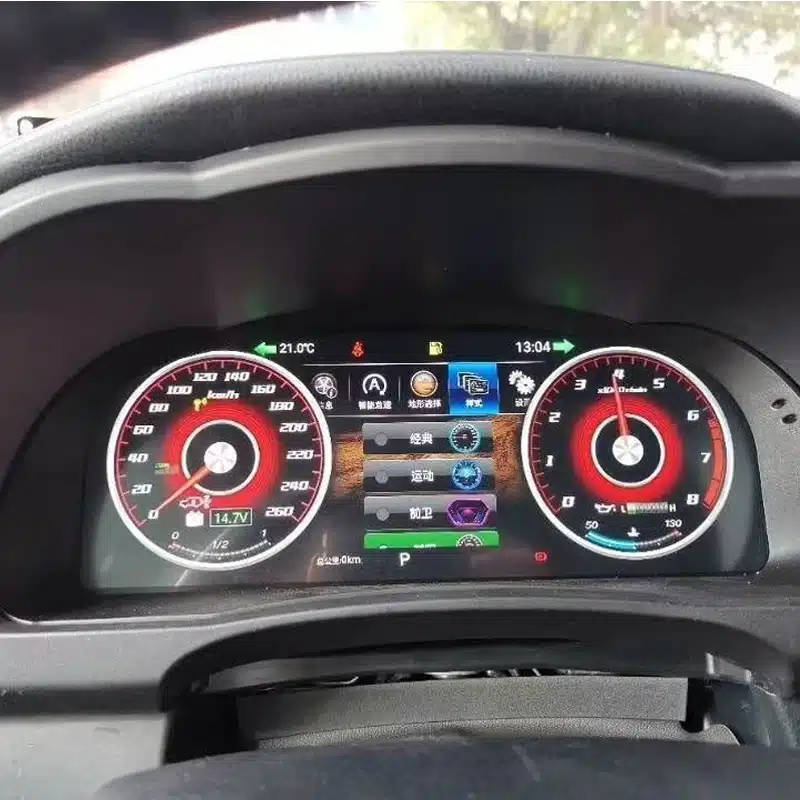
Sesuaikan tampilan panel instrumen agar sesuai dengan berkendara sehari-hari, perjalanan jarak jauh, informasi bergaya sporty, atau penggunaan di medan off-road.
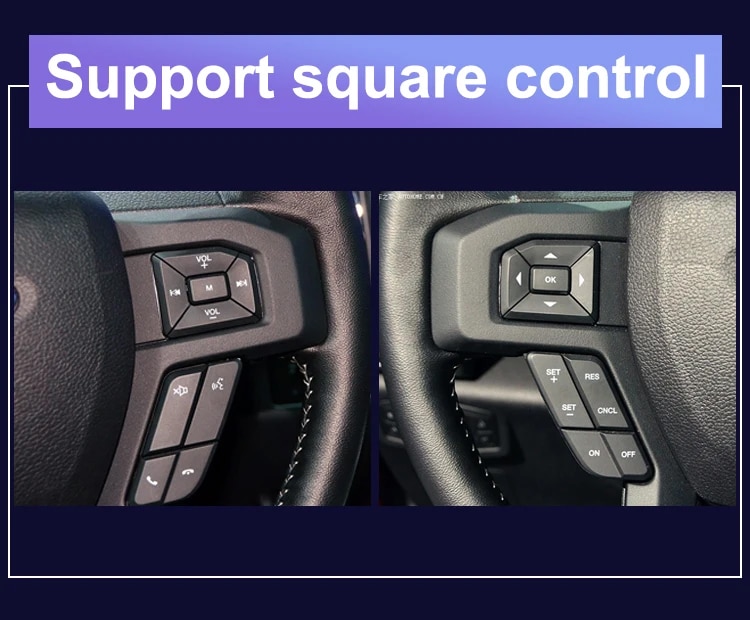
Gunakan tombol-tombol asli pada setir yang didukung untuk mengganti halaman tampilan dan mengoperasikan fungsi-fungsi panel instrumen yang kompatibel.
Bagian penutup ini mengikuti bentuk dasbor Highlander sehingga terlihat lebih rapi dan menyatu.
iKAGOO memeriksa tahun produksi, dasbor, cluster asli, sistem penggerak, dan konfigurasi regional kendaraan Anda sebelum memproses pesanan Anda.
Cluster instrumen digital berukuran 12,3 inci ini dirancang untuk konfigurasi Toyota Highlander tahun 2015–2019 yang didukung. Ini merupakan peningkatan yang signifikan bagi para pemilik yang menginginkan speedometer digital berukuran lebih besar, informasi kendaraan yang lebih jelas, serta lingkungan berkendara yang lebih modern.
Untuk menyiapkan versi yang tepat, iKAGOO akan memeriksa tahun pembuatan kendaraan Anda, foto dasbor, tampilan panel instrumen asli, konfigurasi bensin atau hibrida, posisi setir, serta pasar kendaraan sebelum pengiriman. Hal ini membantu kami menyiapkan layar, kabel, dan pengaturan yang tepat untuk pesanan Anda.
Nilai Peningkatan Sehari-hari
Manfaat utamanya bukan sekadar mengganti pengukur mekanis dengan sebuah layar. Melainkan membuat informasi yang Anda gunakan setiap hari lebih mudah dibaca, lebih mudah diatur, dan lebih menyenangkan untuk dilihat.
Pengukur digital dan grafis berukuran besar membuat informasi kecepatan dan mesin lebih mudah dikenali tanpa harus bergantung pada layar informasi kecil di bagian tengah.
Informasi terkait jarak tempuh, perjalanan, bahan bakar, jangkauan, tekanan ban, dan peringatan dapat disusun dalam tata letak digital yang lebih jelas.
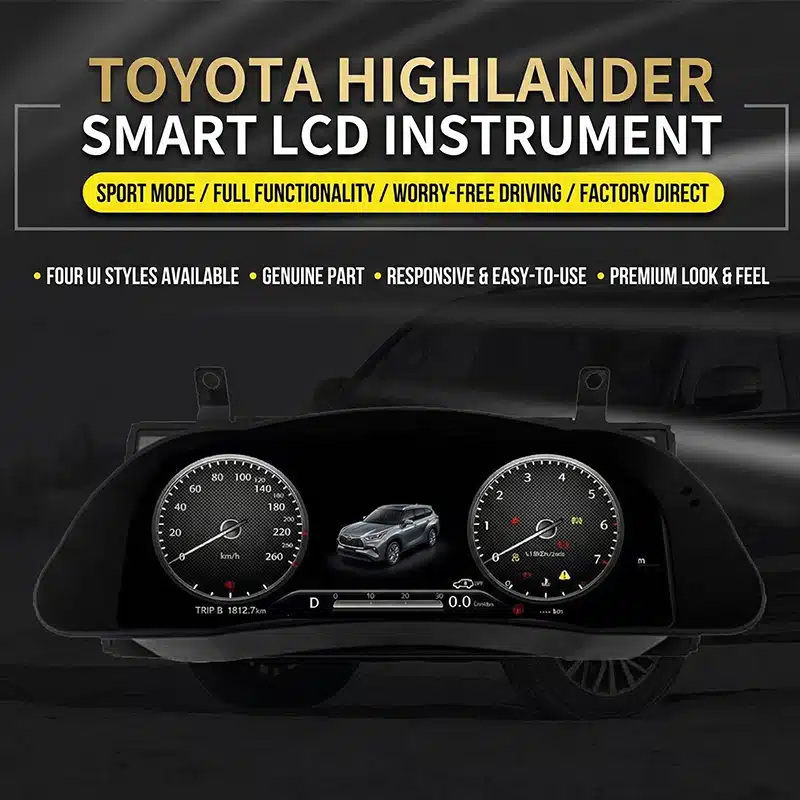
Pilih salah satu dari gaya tampilan yang tersedia untuk menonjolkan panel instrumen klasik, informasi berkendara, data perjalanan, atau tampilan yang lebih sederhana untuk berkendara sehari-hari.
Tombol-tombol asli pada setir yang didukung tetap dapat digunakan sehingga Anda dapat mengganti halaman panel instrumen dan mengakses informasi berkendara dengan lebih nyaman.
Perbarui bagian interior yang berada tepat di depan Anda tanpa harus mengganti radio atau mengubah seluruh sistem konsol tengah.
iKAGOO menggunakan informasi dan foto kendaraan Anda untuk membantu menyiapkan konfigurasi panel instrumen yang sesuai serta solusi koneksi yang tepat.
Fungsi Asli Kendaraan Didukung
Dengan versi kendaraan yang tepat, kabel yang sesuai, dan pemasangan yang benar, panel instrumen ini dirancang untuk terus menampilkan informasi yang didukung yang disediakan oleh Highlander Anda.
Informasi kecepatan kendaraan dan putaran mesin tetap ditampilkan melalui antarmuka panel instrumen digital yang baru.
Informasi odometer, jarak tempuh harian, dan jarak tempuh total yang didukung tetap tersedia setelah panel instrumen telah disiapkan dan dikonfigurasi dengan benar.
Tingkat bahan bakar, informasi konsumsi yang didukung, dan jarak tempuh yang tersisa tetap ditampilkan untuk perencanaan perjalanan sehari-hari.
Informasi tekanan ban yang didukung serta peringatan ban tetap terlihat melalui layar digital.
Peringatan terkait mesin, rem, sabuk pengaman, dan kondisi kendaraan tetap ditampilkan setelah pemasangan yang benar.
Tombol-tombol asli pada setir yang didukung tetap dapat digunakan untuk mengoperasikan halaman dan pengaturan panel instrumen yang kompatibel.
Versi yang didukung memungkinkan pengguna memilih satuan MPH atau KM/H serta satuan suhu atau tekanan ban yang sesuai.
Informasi ACC dan peringatan keluar jalur yang didukung dapat terus ditampilkan pada kendaraan yang sejak awal dilengkapi dengan fungsi-fungsi tersebut.
Lihat Detail Pembaruan
Pelajari bentuk panel instrumen, tampilan di dalam kabin, dan tata letak antarmuka yang tersedia untuk memahami bagaimana pembaruan ini mengubah lingkungan berkendara Highlander.


Penilaian Pembelian iKAGOO
Ketiga penilaian iKAGOO ini membantu Anda menentukan apakah peningkatan tersebut sesuai dengan rencana kepemilikan Anda, konfigurasi kendaraan Anda, dan metode pemasangan yang Anda pilih.
Peningkatan ini menawarkan manfaat yang sangat besar dalam penggunaan sehari-hari bagi para pemilik Highlander yang berencana mempertahankan kendaraan tersebut dan menginginkan pengalaman informasi pengemudi yang lebih jelas dan modern.
Peningkatan tersebut mungkin tidak terlalu diperlukan jika panel instrumen aslinya masih berfungsi dengan baik dan Anda lebih memilih untuk mempertahankan interior mobil tetap sepenuhnya asli.
Produk ini dievaluasi berdasarkan kerangka kerja Kebutuhan Peningkatan iKAGOO, yang mempertimbangkan kondisi sistem pabrik, peningkatan dalam penggunaan sehari-hari, nilai kepemilikan jangka panjang, alternatif yang tersedia, serta nilai praktis dari peningkatan tersebut.
Baca kerangka kerja Kebutuhan Pembaruan iKAGOOCasing khusus Highlander, jalur koneksi yang disesuaikan, dan fungsi data kendaraan yang didukung dirancang agar peningkatan ini terasa menyatu dengan kendaraan, bukan sekadar ditambahkan sebagai layar terpisah.
Kualitas kompatibilitas mencakup pemasangan fisik, informasi kendaraan, kontrol asli, tampilan peringatan, desain antarmuka, serta integrasi secara keseluruhan. Hal ini tidak berarti bahwa persentase tertentu dari fungsi asli dihapus.
Hasil ini didasarkan pada kerangka kerja Kompatibilitas Kendaraan Asli iKAGOO. Kerangka kerja ini mengevaluasi kelangsungan fungsi bawaan pabrik, kontrol asli, integrasi data kendaraan dan peringatan, arsitektur fisik, interaksi bergaya pabrik, serta integrasi pemasangan.
Hasil tersebut mencerminkan kualitas integrasi secara keseluruhan dari proses peningkatan tersebut. Hal ini tidak berarti bahwa persentase fungsi pabrik yang hilang atau tetap sama.
Baca kerangka kerja Kompatibilitas Kendaraan Asli iKAGOODisarankan untuk melakukan pemasangan oleh tenaga profesional karena pekerjaan ini mencakup pembongkaran area instrumen, penyesuaian konektor, pengaturan kendaraan, dan pemeriksaan menyeluruh terhadap fungsi peringatan, data, dan daya.
Tingkat pemasangan yang lebih tinggi mencerminkan besarnya pekerjaan profesional yang diperlukan. Hal ini tidak menandakan kualitas produk yang lebih rendah, kompatibilitas yang lebih rendah, atau nilai peningkatan yang lebih rendah.
Tingkat pemasangan ini ditetapkan berdasarkan kerangka kerja Kesulitan Pemasangan Elektronik Mobil iKAGOO. Kerangka kerja ini memperhitungkan pembongkaran dasbor, sambungan kabel, perutean kabel, konfigurasi CANBUS, pengujian fungsi, perilaku daya, serta tingkat pengalaman yang diperlukan dari teknisi pemasang.
Tingkat kesulitan pemasangan menggambarkan upaya yang diperlukan untuk menyelesaikan pemasangan dengan benar. Hal ini tidak berarti kualitas produk lebih rendah atau nilai peningkatan yang lebih rendah.
Baca kerangka kerja Tingkat Kesulitan Instalasi iKAGOOPilih Jalur Peningkatan yang Tepat
Setiap solusi dirancang untuk memenuhi kebutuhan yang berbeda. Perbandingan ini akan membantu Anda memilih opsi yang sesuai dengan hal yang ingin Anda tingkatkan pada mobil Highlander Anda.
| Pilihan | Apa yang Berubah | Paling Cocok Untuk | Pertimbangan Utama |
|---|---|---|---|
| iKAGOO Digital Cluster | Menggantikan rakitan pengukur asli dengan layar digital lengkap. | Para pemilik yang menginginkan panel instrumen modern, tema yang dapat dipilih, dan informasi berkendara yang lebih jelas. | Membutuhkan persiapan khusus sesuai jenis kendaraan dan pemasangan oleh tenaga profesional. |
| Perbaikan Kluster Asli | Memperbaiki rakitan instrumen pabrik yang sudah ada. | Pemilik yang lebih menyukai tampilan aslinya dan hanya perlu memperbaiki kerusakan yang sudah ada. | Cluster yang telah diperbaiki tetap mempertahankan desain tampilan aslinya. |
| Cluster Asli Bekas | Mengganti panel instrumen yang rusak dengan unit lain yang bergaya asli. | Pemilik yang dapat memperoleh komponen asli yang persis sama. | Jarak tempuh, sistem pengkodean, spesifikasi, dan kondisi suku cadang mungkin memerlukan perhatian lebih lanjut. |
| Modul CarPlay | Menambahkan fitur konektivitas ponsel yang didukung ke sistem infotainment di bagian tengah. | Para pemilik umumnya menginginkan fitur navigasi ponsel, musik, dan panggilan. | Fitur ini tidak menggantikan atau memodernisasi panel instrumen. |
| Unit Kepala Android | Memperbarui layar tengah dan sistem multimedia. | Pemilik yang menginginkan aplikasi Android, fitur navigasi, dan fitur multimedia. | Ini adalah produk yang berbeda dari layar instrumen pengemudi ini. |
Pelajari Lebih Lanjut Tentang Detail Produk
Periksa opsi tampilan, konfigurasi fisik, koneksi bagian belakang, kabel yang disertakan, serta contoh kontrol pada setir sebelum memilih konfigurasi Anda.
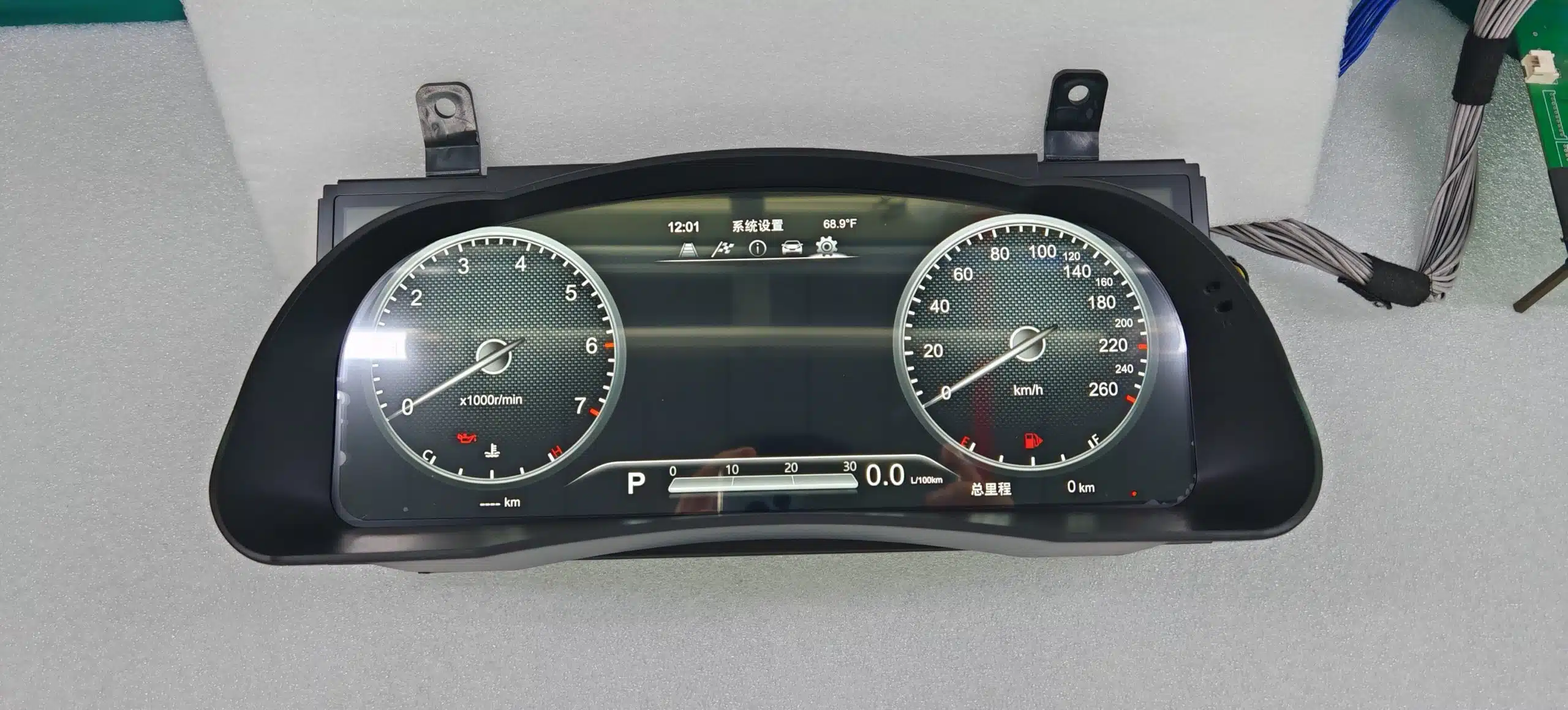
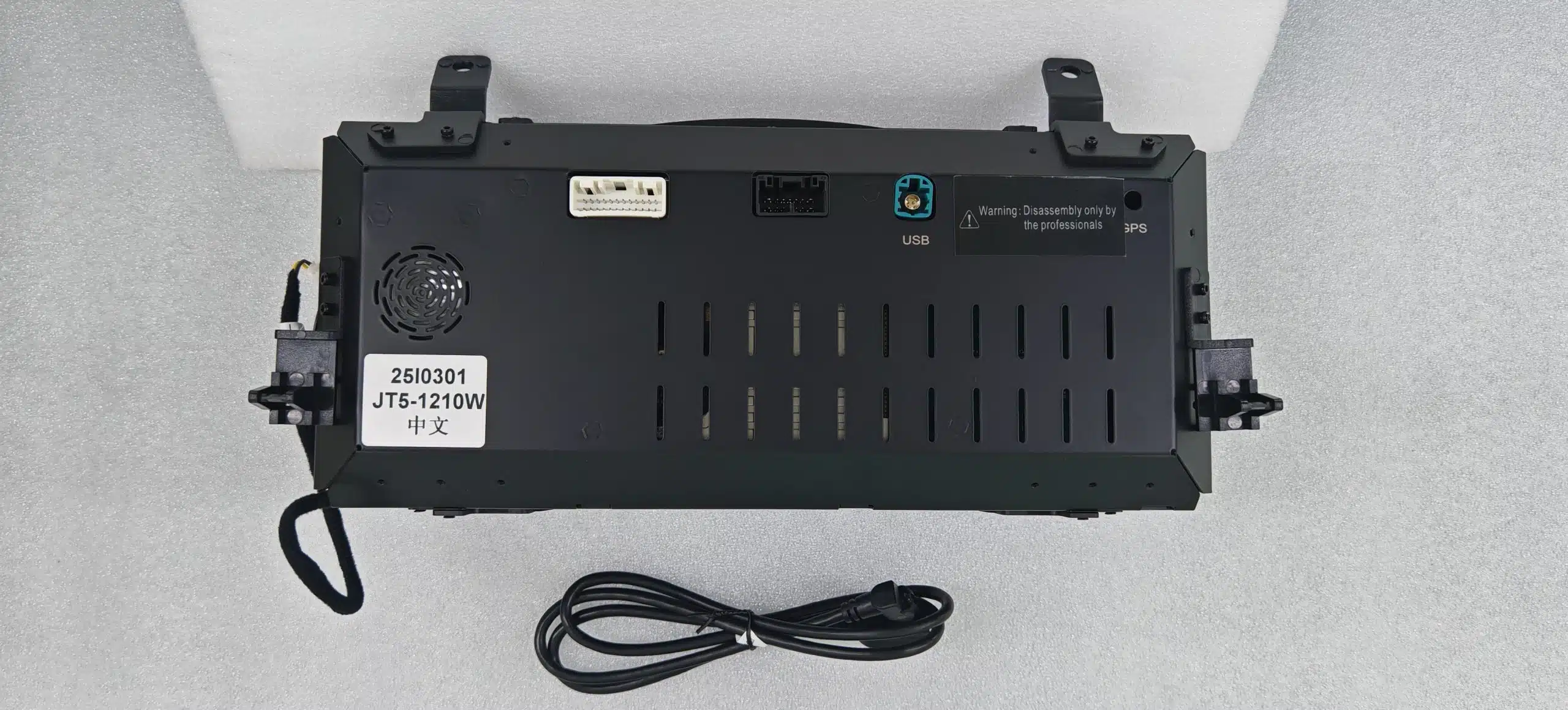
Spesifikasi Produk
Cluster ini berfokus pada informasi kendaraan dan tampilan pengemudi. Cluster ini tidak dimaksudkan untuk menggantikan fungsi multimedia dari unit utama Android atau sistem CarPlay.
| Jenis Produk | Kluster instrumen digital lengkap yang disesuaikan dengan model kendaraan |
|---|---|
| Aplikasi Kendaraan | Toyota Highlander, mendukung varian tahun 2015–2019 |
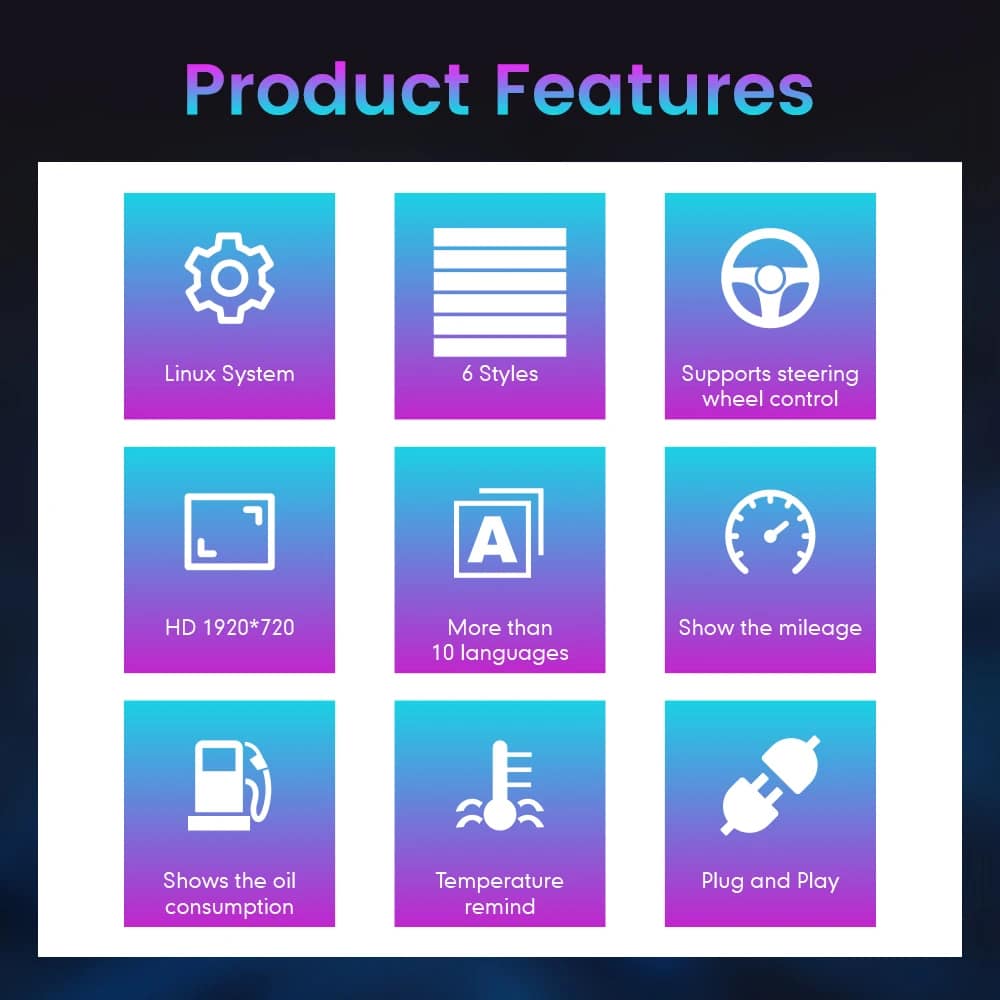
| Ukuran Layar | 12.3-inch |
| Jenis Tampilan | Layar instrumen digital HD QLED |
| Resolusi | 1920 × 720 |
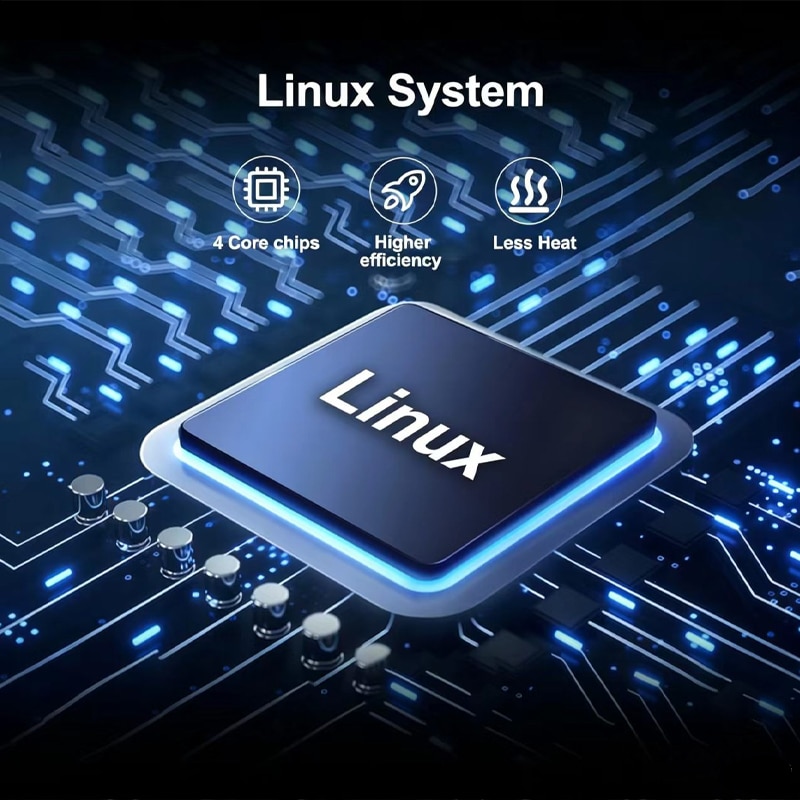
| Sistem Operasi | Linux |
| Memperbarui Kinerja | Hingga 60 fps |
| Startup | Pengaktifan Linux yang cepat, dirancang untuk penggunaan pada instrumen |
| Tema Tampilan | Enam gaya antarmuka yang dapat dipilih |
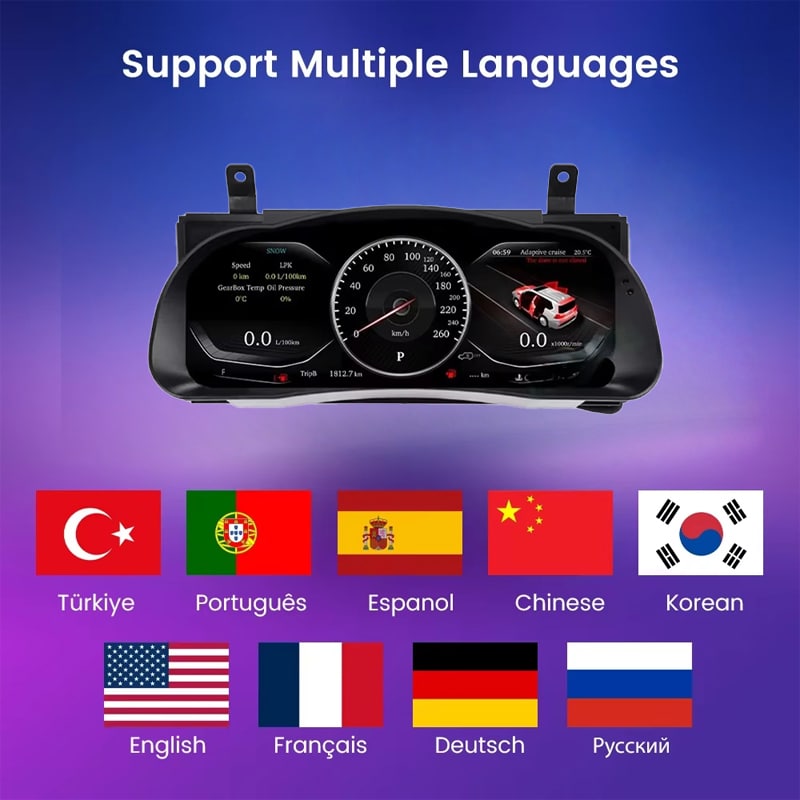
| Bahasa | Tersedia lebih dari 10 bahasa antarmuka; pastikan Anda memilih bahasa yang diinginkan saat memesan |
| Informasi Kendaraan | Kecepatan yang didukung, RPM, jarak tempuh, perjalanan, bahan bakar, jangkauan, TPMS, dan informasi peringatan kendaraan |
| Satuan | Pengaturan satuan yang didukung: MPH/KM/H, suhu, dan tekanan ban |
| Kontrol Asli | Mendukung pengoperasian tombol-tombol di setir seperti aslinya |
| Rentang Operasi yang Ditentukan | -40°C hingga +80°C |
| Metode Koneksi | Rute sambungan khusus kendaraan yang disesuaikan, dirancang untuk menghindari pemotongan sengaja pada kabel utama pabrik yang didukung |
| Pilihan Tahun yang Tersedia | Versi 2015–2018 dan versi 2018–2019 |
| Berat Pengiriman | 8 kg |
| Dimensi Paket | 48 × 38 × 28 cm |
| Fokus Produk | Pengukur digital dan informasi kendaraan yang didukung. Aplikasi Android, Apple CarPlay, Android Auto, sistem audio DSP, 4G, Wi-Fi, serta fungsi multimedia Bluetooth bukanlah tujuan dari produk ini. |
Pilih Konfigurasi yang Tepat
Tahun model kendaraan Anda memang penting, namun tampilan panel instrumen asli, sistem penggerak, dan pasar kendaraan juga membantu iKAGOO menyiapkan konfigurasi yang paling sesuai.
Pilih opsi ini untuk konfigurasi instrumen sebelumnya yang sesuai setelah memastikan tampilan cluster aslinya menggunakan iKAGOO.
Pilih opsi ini untuk konfigurasi instrumen selanjutnya yang sesuai setelah iKAGOO memeriksa tata letak cluster dan dasbor aslinya.
Perangkat Keras dan Koneksi
iKAGOO menyiapkan aksesori koneksi yang sesuai berdasarkan informasi kendaraan yang telah dikonfirmasi untuk pesanan Anda.
Pemasangan kabel yang berlaku dapat berbeda-beda tergantung pada tahun produksi kendaraan, panel instrumen asli, konfigurasi bensin atau hibrida, serta pasar kendaraan. iKAGOO akan menyiapkan solusi koneksi setelah memeriksa detail kendaraan Anda.
Persiapan Kendaraan iKAGOO
Beberapa detail kendaraan yang jelas memungkinkan iKAGOO untuk menyiapkan layar, pemasangan kabel, dan konfigurasi yang sesuai sebelum pesanan Anda dikirim.
Sebutkan tahun model yang tepat, terutama saat memesan untuk Highlander tahun 2018.
Kirimkan foto yang mencakup area luas yang memperlihatkan setir, panel instrumen asli, dan dasbor di sekitarnya.
Kirimkan foto tampilan depan yang jelas yang memperlihatkan tata letak panel instrumen asli dan layar informasi di bagian tengah.
Sebutkan sistem penggerak agar antarmuka RPM, bahan bakar, atau energi yang sesuai dapat disiapkan.
Sebutkan negara, spesifikasi AS jika berlaku, dan apakah kendaraan tersebut berkemudi kiri (LHD) atau berkemudi kanan (RHD).
Ceritakan kepada kami mengenai penggantian modul, perubahan kabel, alarm, atau komponen elektronik kendaraan aftermarket lainnya.
Perencanaan Pemasangan
Pemasangan yang benar tidak hanya sekadar menghubungkan cluster. Pemasang juga harus memeriksa data kendaraan yang ditampilkan, informasi peringatan, kontrol kemudi, dan perilaku saat sistem dimatikan.
Ambil foto odometer asli, peringatan, panel, tingkat bahan bakar, dasbor, dan panel instrumen sebelum membongkar.
Gunakan alat pemotong yang sesuai dan lindungi dasbor, kolom kemudi, serta permukaan interior di sekitarnya.
Putuskan sambungan daya kendaraan dengan benar, lalu lepaskan rakitan instrumen asli tanpa menarik atau memutar konektor bawaan pabrik.
Sesuaikan setiap sambungan berdasarkan bentuk steker, sistem penguncian, dan petunjuk yang disertakan. Jangan pernah memaksakan steker ke dalam konektor yang tidak sesuai.
Pastikan jenis mesin (bensin atau hibrida), varian, bahasa, pengaturan kemudi, serta pengaturan data kendaraan yang berlaku.
Periksa kecepatan, RPM, jarak tempuh, informasi perjalanan, bahan bakar, TPMS, lampu peringatan, kontrol kemudi, dan informasi fitur keselamatan yang tersedia.
Matikan dan kunci kendaraan, lalu pastikan bahwa panel instrumen berfungsi sesuai dengan prosedur pematian dan mode tidur yang diharapkan.
Pasang kembali trim tersebut hanya setelah informasi kendaraan yang diperlukan, peringatan, panel kontrol, dan perilaku sistem tenaga telah diperiksa.
Berhenti pada tahap ini membantu melindungi kendaraan, kabel asli pabrik, dan panel instrumen baru, sementara iKAGOO memberikan panduan penyambungan yang tepat.
Dukungan Pembelian dan Purna Jual
Pesanan Anda tidak hanya mencakup layar saja. iKAGOO juga membantu menyiapkan konfigurasi kendaraan serta mendukung proses pemasangan dan layanan purna jual.
Tahun pembuatan kendaraan Anda, dasbor, panel instrumen asli, sistem penggerak, dan detail regional digunakan untuk menyiapkan versi yang sesuai.
Pesanan akan dikirim melalui jalur pengiriman yang dilengkapi pelacakan setelah informasi kendaraan dan konfigurasi produk disiapkan.
Kerusakan perangkat keras yang terverifikasi dan memenuhi syarat ditangani berdasarkan garansi perangkat keras terbatas iKAGOO yang berlaku saat ini.
iKAGOO dapat membantu memeriksa foto koneksi, pengaturan kendaraan, dan informasi uji fungsi ketika diperlukan bantuan pemasangan.
Harap berikan detail kendaraan yang akurat serta foto-foto yang diminta sebelum melakukan pembelian agar iKAGOO dapat menyiapkan versi yang sesuai. Informasi kendaraan yang salah, modifikasi yang tidak diungkapkan, atau keterbatasan sistem kendaraan tidak dianggap sebagai alasan pengembalian dan pengembalian dana tanpa syarat.
Apabila iKAGOO telah memastikan kompatibilitas sebelum pembelian, informasi kendaraan akurat, dan pelanggan bersedia bekerja sama dalam proses pemecahan masalah pemasangan yang wajar, maka kesalahan kompatibilitas iKAGOO yang telah dikonfirmasi akan ditangani sesuai dengan Kebijakan Pengembalian dan Pengembalian Dana yang berlaku.
Opsi pengiriman DDP atau termasuk pajak hanya berlaku jika ditampilkan atau dikonfirmasi secara khusus untuk tujuan dan pesanan tersebut.
Kebijakan Pengiriman • Kebijakan Garansi • Kebijakan Pengembalian dan Pengembalian Dana • Panduan DDP
Pertanyaan Umum (FAQ) tentang Highlander Digital Cluster
Versi yang tersedia dirancang untuk konfigurasi Toyota Highlander tahun 2015–2019 yang didukung. iKAGOO memeriksa tahun produksi, panel instrumen asli, konfigurasi bensin atau hibrida, pasar kendaraan, posisi setir, dan foto dasbor sebelum memproses pesanan.
Pilihlah antara versi 2015–2018 dan 2018–2019 sesuai dengan konfigurasi instrumen asli yang telah dikonfirmasi oleh iKAGOO. Pemilik kendaraan tahun 2018 diharapkan mengirimkan foto dasbor dan panel instrumen asli agar versi yang tepat dapat diidentifikasi.
Ini adalah panel instrumen digital pengganti yang lengkap. Panel ini meningkatkan tampilan panel instrumen pengemudi dan tidak menambahkan fitur CarPlay ke radio di bagian tengah.
Tombol-tombol asli pada setir yang didukung tetap dapat berfungsi untuk halaman dan pengaturan panel instrumen yang kompatibel setelah versi kendaraan yang tepat telah disiapkan dan dikonfigurasi.
Cluster yang telah disesuaikan ini dirancang untuk menampilkan informasi jarak tempuh kendaraan yang didukung setelah melalui persiapan dan konfigurasi yang benar. Catat angka odometer asli sebelum pemasangan dan periksa informasi yang ditampilkan sebelum perakitan akhir.
Informasi TPMS yang didukung dan indikator peringatan kendaraan terus ditampilkan melalui koneksi data kendaraan yang terhubung. Pemasang harus memeriksa setiap indikator peringatan dan status yang diperlukan sebelum menyelesaikan pemasangan.
Produk ini menggantikan panel instrumen, bukan sistem infotainment tengah. Kamera mundur, radio, amplifier, dan speaker asli tetap menjadi bagian dari sistem kendaraan yang ada.
Kendaraan berbahan bakar bensin dan hibrida memiliki persyaratan informasi berkendara yang berbeda. Sebutkan jenis sistem penggerak kendaraan Anda secara tepat sebelum pengiriman agar iKAGOO dapat menyiapkan tampilan dan konfigurasi kendaraan yang sesuai.
Rute sambungan yang sesuai ini dirancang untuk menghindari pemotongan secara sengaja pada kabel utama pabrik yang didukung. Jika steker tidak cocok atau pemasangan tampaknya memerlukan pemotongan kabel utama, hentikan proses dan hubungi iKAGOO untuk mendapatkan panduan.
Disarankan untuk dilakukan pemasangan oleh tenaga profesional. Pekerjaan tersebut meliputi pelepasan trim dasbor, penggantian instrumen, penanganan konektor, konfigurasi kendaraan, serta pengujian menyeluruh terhadap sistem peringatan, data, dan kinerja daya.
Setelah pemasangan, matikan dan kunci kendaraan, lalu pastikan bahwa panel instrumen mati dan masuk ke mode tidur sebagaimana mestinya. Jika panel instrumen tetap menyala, menyala kembali berulang kali, atau aktif secara tak terduga, hentikan sementara proses pemasangan dan hubungi iKAGOO.
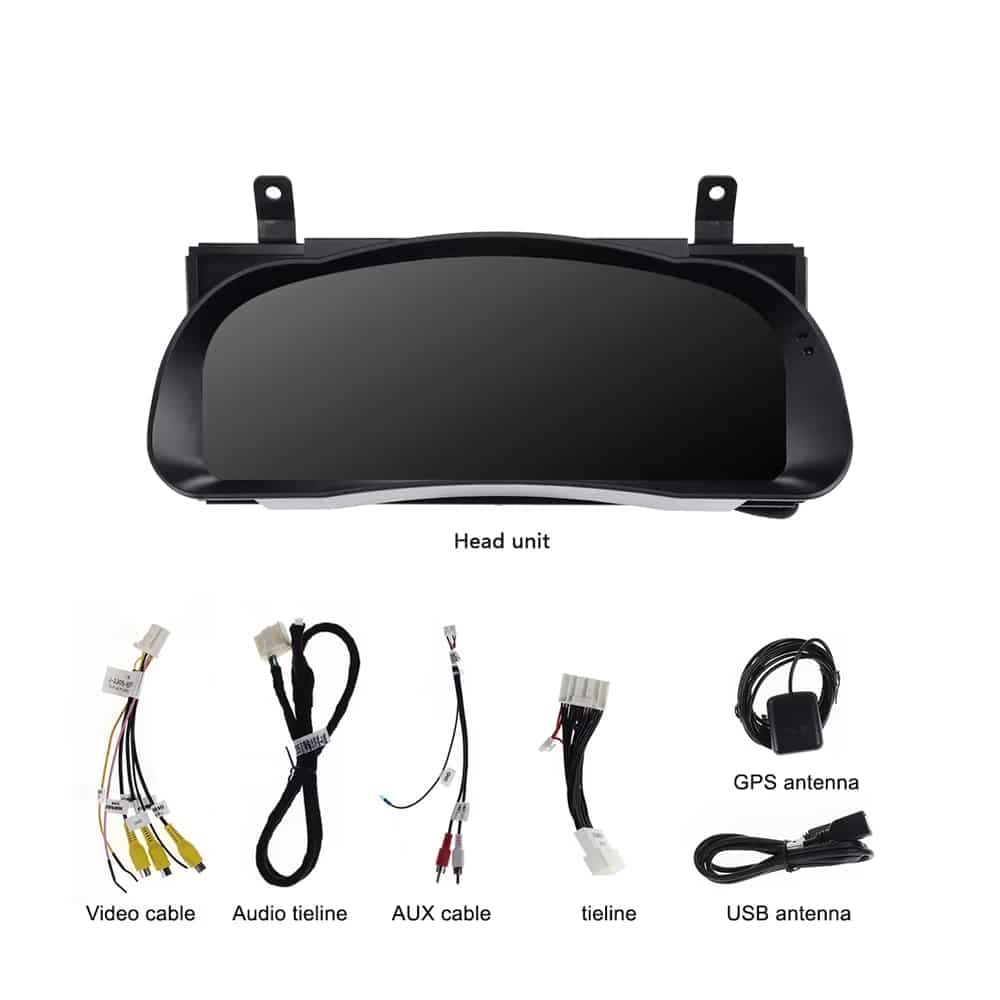
Paket ini mencakup panel instrumen digital dan aksesori koneksi yang sesuai, yang telah disesuaikan untuk varian kendaraan yang telah dikonfirmasi. Gambar produk menampilkan kabel video, kabel koneksi audio, kabel AUX, kabel koneksi utama, antena GPS, dan kabel USB.
Perangkat keras yang memenuhi syarat dilindungi oleh garansi perangkat keras terbatas iKAGOO selama 12 bulan yang berlaku, terhitung sejak tanggal pengiriman dikonfirmasi. Dukungan untuk pemasangan, konfigurasi, dan pemecahan masalah tersedia sesuai dengan ketentuan produk dan kebijakan yang berlaku.
Kirimkan tahun pembuatan yang tepat, foto dasbor, foto panel instrumen asli, konfigurasi bensin atau hibrida, negara atau pasar kendaraan, informasi LHD atau RHD, serta rincian modifikasi yang pernah dilakukan.
iKAGOO membandingkan tahun pembuatan kendaraan Anda, tampilan panel instrumen asli, struktur dasbor, sistem penggerak, konfigurasi regional, dan posisi setir dengan solusi panel instrumen dan kabel yang tersedia sebelum memproses pesanan.
Lakukan Riset Sebelum Membeli
Pilih konfigurasi tahun kendaraan Anda di bagian pembelian dan lampirkan foto dasbor, foto cluster asli, serta informasi mengenai sistem penggerak dan pasar kendaraan Anda. iKAGOO akan menggunakan detail tersebut untuk menyiapkan layar, kabel, dan konfigurasi yang sesuai untuk pesanan Anda.
Toyota dan Highlander adalah merek dagang dari masing-masing pemiliknya. iKAGOO adalah penyedia independen perangkat elektronik aftermarket yang dirancang khusus untuk kendaraan tertentu dan tidak berafiliasi dengan Toyota Motor Corporation.

Informasi jelas tentang kompatibilitas kendaraan, persiapan pesanan, pengiriman internasional, garansi, retur, dan dukungan purna jual.
Elektronik khusus kendaraan memerlukan versi yang tepat, kabel, dan konfigurasi. Proses kami dirancang untuk mengurangi masalah kompatibilitas dan pemasangan yang dapat dihindari.
Model kendaraan, tahun, sistem asli, dan informasi konfigurasi terkait dapat ditinjau sebelum pembelian untuk mengurangi risiko memilih versi yang salah.
Sebelum pengiriman, pesanan diperiksa berdasarkan informasi kendaraan yang telah dikonfirmasi sehingga versi, konfigurasi, dan komponen khusus kendaraan yang diperlukan dapat disiapkan.
Tujuan kami adalah memastikan pesanan Anda benar sebelum dikirim. Kami memverifikasi kompatibilitas, menyiapkan pengaturan yang tepat, dan menghubungi Anda hanya jika masih ada yang perlu konfirmasi.
Ringkasan praktis dari ketentuan utama yang berlaku untuk pesanan iKAGOO khusus kendaraan.
Sebagian besar pesanan iKAGOO dikirim dari lokasi pemenuhan kami di China setelah konfigurasi produk dan informasi kendaraan telah diperiksa.
Pemrosesan pesanan normal memakan waktu sekitar 1-3 hari kerja. Estimasi pengiriman setelah barang dikirim umumnya:
Pengurusan bea cukai, hari libur, cuaca, keterlambatan kurir, dan pengiriman ke area terpencil dapat memengaruhi perkiraan ini.
Pengiriman internasional standar biasanya tidak termasuk PPN negara tujuan, bea masuk, biaya perantara, atau biaya pengurusan bea cukai.
Untuk destinasi Uni Eropa yang memenuhi syarat, pengiriman DDP mungkin tersedia. Biaya terkait impor hanya termasuk saat DDP dipilih saat checkout atau dikonfirmasi oleh iKAGOO secara tertulis sebelum pengiriman.
Saat DDP tidak dipilih, biaya yang dikenakan oleh bea cukai setempat atau kurir pengiriman biasanya menjadi tanggung jawab penerima.
Pengiriman ekspres atau dipercepat mungkin tersedia untuk produk dan destinasi tertentu. Ketersediaan, kurir, dan biaya tambahan apa pun dikonfirmasi sebelum pengiriman.
Tergantung pada rute dan jenis produk, iKAGOO dapat menggunakan DHL, FedEx, UPS, EMS, 4PX atau penyedia logistik terlacak lainnya.
Setelah pengiriman, nomor pelacakan atau tautan pelacakan biasanya dikirim ke alamat email yang digunakan untuk pesanan. Pembaruan pelacakan mungkin memerlukan beberapa hari kerja untuk muncul selama transfer kurir internasional.
Kelayakan pengembalian tergantung pada alasan pengembalian, kondisi produk, status pemasangan, bukti pendukung, dan apakah pengembalian telah disetujui oleh iKAGOO.
Untuk pengembalian non-cacat yang disetujui, produk biasanya harus tetap tidak digunakan, tidak terpasang, lengkap, dan layak untuk dijual kembali. Pelanggan umumnya bertanggung jawab atas biaya pengiriman pengembalian yang disetujui.
Biaya pengiriman asli, DDP, PPN, bea cukai, dan biaya logistik lainnya umumnya tidak dapat dikembalikan kecuali diwajibkan oleh hukum atau dikonfirmasi sebaliknya oleh iKAGOO.
Jangan mengirim produk kembali sebelum menerima alamat pengembalian yang disetujui dan instruksi pengembalian dari iKAGOO.
Perlindungan tambahan dapat berlaku jika iKAGOO telah meninjau kompatibilitas kendaraan, pelanggan memberikan informasi kendaraan yang akurat, dan langkah-langkah pemasangan serta diagnostik yang wajar telah diselesaikan.
Jika iKAGOO mengonfirmasi bahwa tidak ada solusi teknis yang wajar tersedia dan masalah dilaporkan dalam 7 hari kalender setelah pengiriman, pelanggan mungkin memenuhi syarat untuk pengembalian dana sebesar harga produk tanpa diwajibkan untuk mengembalikan produk tersebut.
Biaya pengiriman asli, DDP, PPN, bea cukai, dan biaya pihak ketiga lainnya tidak termasuk dalam pengembalian dana harga produk ini.
Produk yang memenuhi syarat mencakup sebuah Garansi perangkat keras terbatas selama 12 bulan mencakup cacat produksi yang terverifikasi dan kegagalan perangkat keras yang memenuhi syarat dalam penggunaan normal.
Tergantung pada masalah yang terverifikasi, dukungan dapat mencakup diagnosis jarak jauh, bantuan konfigurasi, suku cadang pengganti, perbaikan, penggantian, pengembalian dana sebagian, atau pengembalian dana penuh.
Inspeksi atau pemeriksaan pihak ketiga tidak secara otomatis membatalkan seluruh garansi. Namun, kerusakan yang disebabkan oleh perbaikan tidak sah, modifikasi yang salah, sirkuit rusak, perakitan ulang yang tidak benar, perkabelan yang salah, benturan, masuknya air, atau penyalahgunaan biasanya tidak ditanggung.
Hubungi iKAGOO sebelum membongkar, memodifikasi, atau memperbaiki produk agar prosedur diagnostik yang benar dapat diberikan.
Hubungi iKAGOO dalam waktu 7 hari kalender setelah pengiriman dan simpan kemasan asli, label pengiriman, aksesori dan produk.
Mohon berikan foto atau video yang jelas yang memperlihatkan:
Setelah verifikasi, iKAGOO dapat mengatur pengiriman bagian yang hilang, penggantian, perbaikan, pengembalian dana, atau solusi wajar lainnya.
Hubungi iKAGOO sesegera mungkin dan sebelum pemasangan. Untuk perubahan alamat, konfigurasi kendaraan, atau produk, hubungi kami sebaiknya dalam 12 jam setelah melakukan pemesanan.
Penukaran atau pengembalian dapat disetujui apabila produk yang salah dipilih masih belum digunakan, belum terpasang, lengkap, dan layak untuk dijual kembali. Pelanggan biasanya bertanggung jawab atas biaya pengiriman dan selisih harga yang relevan.
Produk khusus kendaraan dapat memasuki proses pengadaan, pemrograman, pengujian, atau konfigurasi segera setelah pembayaran. Setelah persiapan atau pengiriman dimulai, pembatalan mungkin tidak dapat dilakukan lagi, atau biaya wajar yang telah dikeluarkan dapat dipotong.
Isi paket bervariasi tergantung produk, model kendaraan, sistem pabrik dan konfigurasi yang dipilih.
Tergantung pada produk, paket dapat mencakup perangkat utama, kabel harness khusus kendaraan, antarmuka CANBUS, adaptor, kabel USB, antena, mikrofon, perangkat pemasangan, atau aksesori instalasi lain yang diperlukan.
Lihat foto produk, spesifikasi, dan konfirmasi pesanan yang relevan untuk mengetahui isi pesanan Anda secara pasti.
Anda dapat menghubungi iKAGOO melalui formulir kontak di situs web, WhatsApp, atau saluran dukungan lain yang tersedia. Waktu respons umumnya dalam 24 jam kerja.
Untuk diagnosis teknis yang lebih cepat, sertakan nomor pesanan, model dan tahun kendaraan, foto sistem pabrik yang relevan, foto produk, dan video jelas yang menunjukkan masalahnya.
Pembayaran diproses melalui metode pembayaran aman yang ditampilkan saat checkout.
Opsi kartu, dompet, dan cicilan yang tersedia dapat bervariasi menurut negara, mata uang, penyedia pembayaran, dan kelayakan pelanggan.
Layanan cicilan, termasuk opsi yang ditawarkan oleh PayPal atau penyedia pembayaran lain, tetap tunduk pada ketersediaan regional dan persyaratan persetujuan penyedia tersebut.
Bagian ini adalah panduan pelanggan yang disederhanakan. Halaman kebijakan yang diterbitkan lengkap, konfirmasi pesanan, dan hukum konsumen yang berlaku akan diutamakan jika ada perbedaan kata-kata.
$780.00 Harga aslinya adalah: $780.00.$680.00Harga saat ini adalah: $680.00.
Pengiriman final dikonfirmasi dari alamat pengiriman Anda saat checkout.

Pilih apa yang ingin Anda beli. Kami hanya menampilkan detail yang diperlukan untuk produk tersebut.
Kami akan meninjau detailnya dan mengirimkan rekomendasi versi produk yang direkomendasikan ke email Anda.
Kami menggunakan cookie penting untuk menjaga situs tetap aman dan berfungsi dengan baik. Dengan persetujuan Anda, kami juga dapat menggunakan cookie analitik untuk meningkatkan pengalaman menjelajah. Lihat Kebijakan Privasi.




Colin Mercer -
Saya terutama tertarik untuk mengetahui bagaimana sistem ini akan berfungsi saat dinyalakan di pagi hari yang dingin. Sejauh ini, sistemnya menyala dengan cepat dan layarnya tetap jernih meski kabin masih dingin. Informasi tekanan ban sangat berguna terutama saat terjadi perubahan suhu di musim dingin. Butuh beberapa kali perjalanan untuk memutuskan tata letak mana yang saya sukai, tetapi antarmukanya mudah dipahami setelah pengaturan dasar selesai.